Data stored in Dataedo
Dataedo is an on-premise application. This means that it runs locally, and that the data is stored in a repository on your server. This approach helps to ensure the security of your data. It is still, however, important to understand what data is actually read and stored in Dataedo, and how it can be used.
On-prem architecture
Dataedo is an on-premise software. There is no data encryption involved when your data is processed, as everything happens locally. To ensure the highest level of safety, we advise following certain precautions when setting up your local repository.
Metadata
When connecting to a Data Source, Dataedo extracts metadata — information relating to your data's organization, and characteristics. Depending on a source, it can be read from the stored information schema, application logs, or using other comparable methods. Only the metadata is stored in your local Dataedo Repository, no actual data (involving potentially sensitive data) is kept in Dataedo during the metadata import. You can read more about metadata extracted from each supported Data Source in the data sources section.
The stored Metadata is the basis of all other processes and operations in Dataedo with the exception of Data Quality, Data Profiling, and Data Classification which use samples of real data. Learn more in the dedicated sections below
Data Profiling and Data Quality
Data Profiling
Data Profiling is concerned with quantitative information regarding your data — mean length of strings in a column, the most common value, number of null values, distinct values et cetera. As such it requires access to your data. During Profiling, Dataedo queries your database to read and analyze the data. The only information stored permanently is data samples. If enabled, the top values of each column are saved in the dbo.column_values of your repository.
When Profiling is run from the Dataedo Portal, its results — statistics, value distributions, and profiling history — are stored in your repository so they can be presented in the catalog. How much is kept for each column depends on its profiling mode: Full also stores sample values (such as a column's top values), Statistical keeps only aggregated statistics with no sample values, and None stores no profiling results at all. You can configure these modes globally based on Data Classification results and Data Sensitivity in settings, or review and adjust profiling modes individually before publishing results to your users.
If you have stored Profiling samples earlier but want to delete them, you can set a profiling mode of a column to none. This will permanently remove any stored data.
Data Quality
Data Quality on the other hand, needs access to your Data to check all of the Data Quality rule instances you configured in Dataedo.
If a rule is satisfied (meaning that your data is healthy and compliant with the standards you defined), the data will not be held in Dataedo after the check finishes. However, when a column's row fails the Data Quality check its details are stored in the repository. You can choose to disable storing failed rows, but this feature is necessary to display the failed rows report in the application.
The failed rows information is stored in a [dbo].[dq_failed_rows] table. Its row_values column contains a JSON file with the failed rows' rowIDs. The maximum number of failing rows that can be saved, as well as any extra information saved beside the rowsID are defined when setting up a Data Quality rule instance.
Once the failing value is amended, during the next Data Quality check Dataedo will recognize it as fixed and automatically delete the stored information.
Each failing row can also be ignored by the User to prevent it from getting flagged in subsequent Data Quality checks. Ignored rows are stored in the [dbo].[dq_failed_rows_ignored]. Only the row_id is stored.
So to summarize: Data Quality does not store the entire data of checked columns, only their failing cells. It is important to remember, that if the entire column fails, every one of its cells will be stored, leaving the option to reconstruct that column's contents.
Disabling Data Access
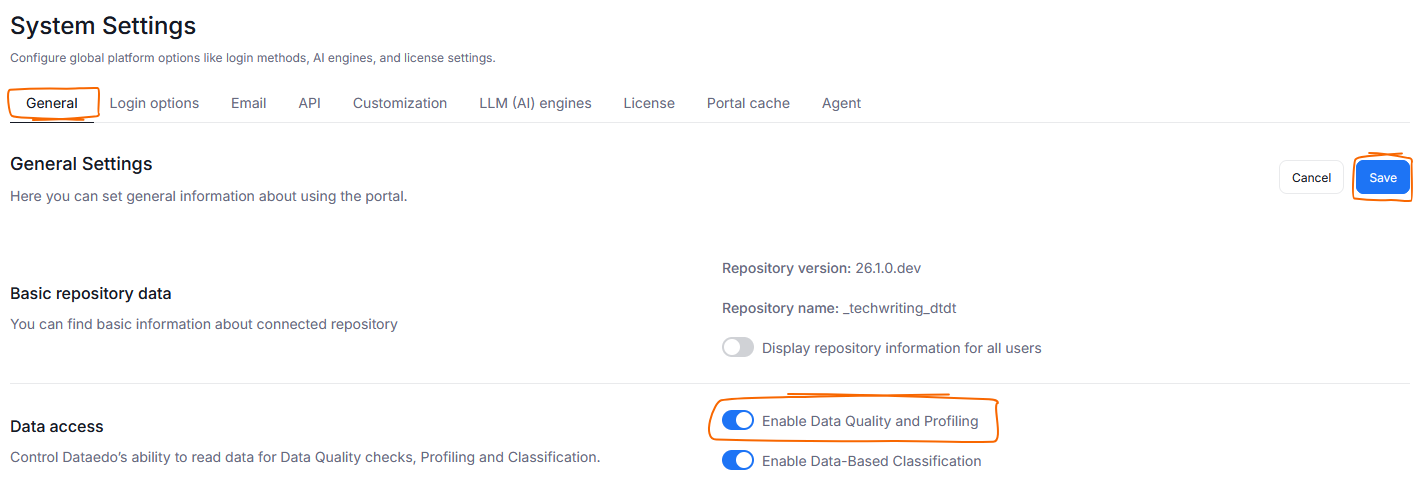
Data Quality and Data Profiling require access to your data. You can decide to disable those functions (and subsequently, Dataedo's access to Data) in the General Tab of System Settings. Find the Enable Data Quality and Profiling toggle, and turn it off. Remember to click save to apply this change.
Data Classification
Data classification reads a sample of data from each checked columns — upwards of 1000 data points per column. This sample is then checked against rules governing the Semantic Type assignment (Semantic Types are used to classify data, learn more here). This happens after a Metadata Import, if Classification is enabled.
The sample data is not stored by Dataedo afterwards.
Disabling Data Access
You can prevent Dataedo from using Data Samples to run Data Classification. To do so head to Settings>System settings and click the General tab. Find and disable the Enable Data-Based Classification toggle. Click Save to remember your choice.
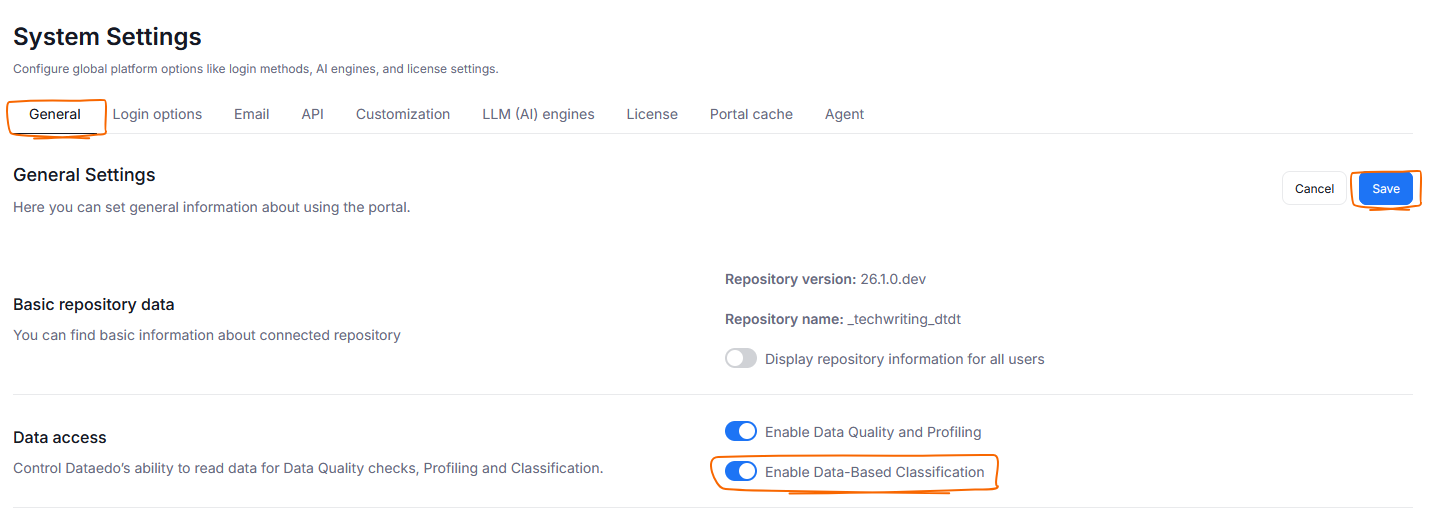
Doing this will not prevent automatic Data Classification from running, but can seriously lower its accuracy since it will be based solely on your column's names (learn more here). Therefore we advise turning this option off only if your organization operates in an extremely data-sensitive field.
Data sent to Dataedo
Dataedo tracks launch logs, crash reports and application usage. The stored information is minimal, and contains only what is necessary for troubleshooting and product analysis purposes.
Launch logs and usage records are periodically sent to Dataedo. As an Administrator, you can choose to opt out of this by blocking the transfer via a firewall, or editing application data.
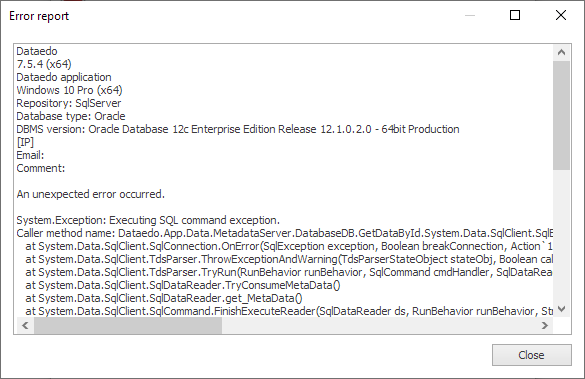
Crash reports are not forwarded to us automatically, but you can choose to send them to our support. Keep in mind that they can contain sensitive information within the stack trace. Always make sure to review the crash reports before sending them to us.
AI Usage
Dataedo does not offer its own AI model. However, your organization can choose to connect a custom AI model to the repository via API. We offer support for selected OpenAI models. Dataedo does not perform any fine-tuning on your models, we use them as-is.
Currently AI models are used to enable the autodocumentation of your metadata and glossary terms.
Dataedo supplies pre-defined queries, supplied with the following information from your repository:
| Object to Generate Description For | Metadata Sent to OpenAI |
|---|---|
Column | Id, Name, DataType, IsNullable, IsUniqueKey, PkConstraint, FkTargetName, DefaultValue, CalculationFormula, ParentName, ParentObjectType |
Table/View | Id, Name, ObjectType, Description, Title, Schema, List of linked terms |
Term/KPI | Id, DisplayName, Code, Description, Title, List of related terms |
The query is then sent to the AI model via API, and the suggested description is returned to the user.
Credentials
When establishing a connection to a database, you provide log-in details. Those credentials are stored locally, for later reuse in repeated connections. The data is encrypted and stored in a JSON file in the dbo.credentials table.
API
You can choose to integrate Dataedo with other tools your organization is using, to streamline data fetching or creation of certain objects. Keep in mind that this creates a connection between your local repository and an external tool. Find our API documentation here.

