Integrate with AI [BETA]
This is a beta feature. The API may change, and LLM-generated responses can be inconsistent or inaccurate.
The widespread adoption of large language models has permanently shifted workflows related to data governance. In response to these rapid changes, and to enable a smoother adoption of AI tools in your work, Dataedo offers the option of integrating AI models with your repository using MCP.
Why integrate?
One question you might have is why bother integrating an AI service with your repository if you can use existing chatbots without any additional configuration. The answer lies in context. Non-integrated models lack fundamental awareness of your repository's organization and the assets within it. Even if you were to describe the local context very meticulously, there are some dependencies you would probably miss. This lack of context can lead to hallucinations; the model simply makes a less-than-educated guess, filling in the gaps with assumptions as necessary.
Model integration, on the other hand, provides the model with controlled access to your data. This way, it can perform better queries and access the necessary information, leading to better insights, even if you send the AI chatbot exactly the same prompts as before.
You can even connect the integrated model to your Microsoft Teams environment to create an interactive chat directly in Teams, which employees can quickly use to draw conclusions from the data documented in your repository.
What is MCP?
MCP stands for Model Context Protocol. It is an open standard, developed by Anthropic, for safely connecting AI agents to external data, systems and applications. Think of it as an API for your AI models that allows for controlled access to your data.
MCP is also what we use to connect AI models to Dataedo.
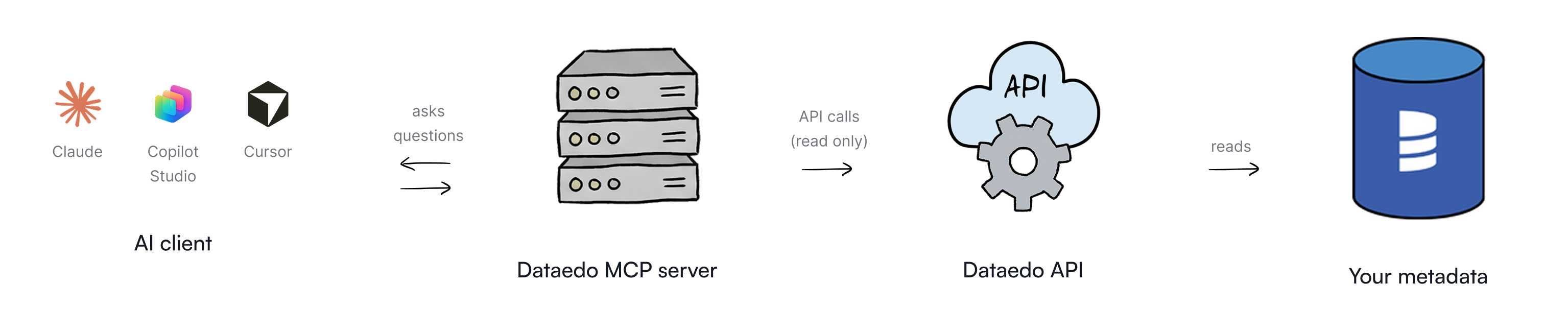
Dataedo's MCP server is a small service that sits between your AI tool and Dataedo. It is a standalone tool, not an integrated part of Dataedo Portal. When you ask a question in your AI client, the MCP server calls Dataedo's API, which reads the answer from your metadata. The AI gets read-only access and cannot modify the data stored in your repository.
What can your model do?
Currently, Dataedo's MCP integration supports the following actions:
- search for objects in your repository catalog by name, title or description
- get detailed information about tables, columns, databases, Data Lineage, etc.
- list tables and procedures in a specific database, with optional filtering
How authentication works
In Hosted Mode, AI clients sign users in through your Dataedo instance's own login page (using any login method enabled there, including SSO) via an OAuth application registered in Settings > OAuth applications. Portal then issues short-lived, signed access tokens (plus refresh tokens) that the MCP server validates on every request. By default, those tokens are signed with keys held only in Portal's memory, so they do not survive a Portal restart. See Keep sign-ins across Portal restarts to avoid repeated logins.
In Local Mode, you sign in with a Personal Access Token generated from your Dataedo profile instead of an organizational login. No matter which mode you choose, the model only ever sees what your Dataedo account is allowed to see.

