Keyword Explorer
The Keyword Explorer allows you to explore the repository by searching for keywords in your databases. Keywords are generated automatically based on frequency of certain terms within your repository and singular objects.
Extracted keywords help you to:
- Search for names and their combinations in your repository
- Find the assets connected with any keyword
- Navigate through similar keywords throughout the repository
Setup
For the Keyword Explorer to work, an Admin user has to run the keyword extraction in settings.
Keyword extraction should be re-run periodically, preferably after major updates to your repository.
Find all details in Keyword Explorer Configuration.
Using Keywords
To search using keywords, use the search bar in the top part of the portal and input your desired term. Once this is done, you can navigate to the Keywords tab. In there you will see a list of keywords matching your search. You can click on the desired keyword to open the Keyword Explorer.
Keyword Explorer view
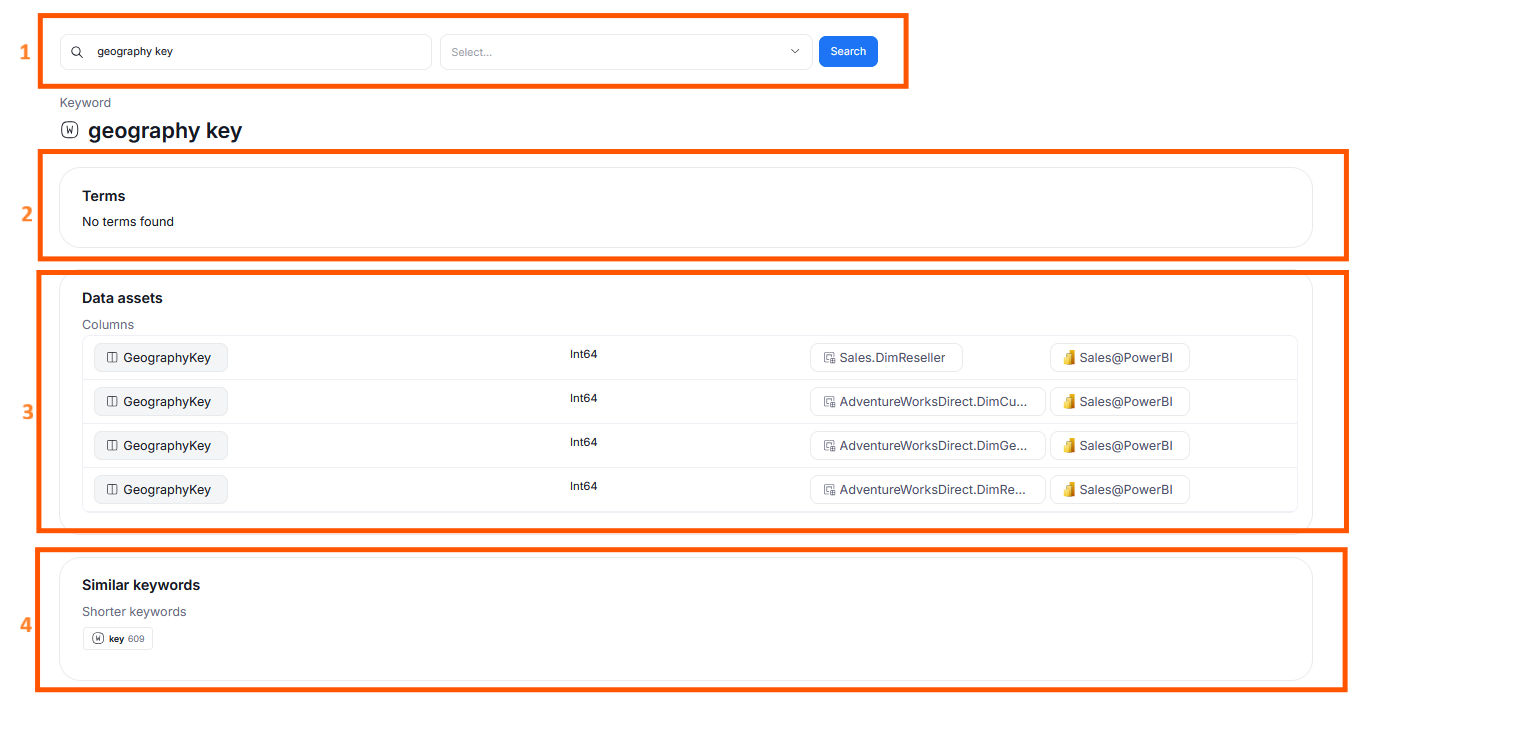
The Keyword Explorer view consists of four parts:
- Keyword search engine with two fields
- Search for keywords – allows searching for a specific keyword, and opens the keyword overview page
- Select a data source – allows choosing a specific database or reporting to narrow the pool of displayed keywords
- Terms - presents an overview of terms with a name equal to the keyword.
- Data assets - presents an overview of Data assets (columns, tables, reports, and report fields) that either:
- have the name equal to the keywords
- are linked with a term that's equal to the keyword
- are tagged with a tag equal to the keyword
- Similar keywords - presents an overview of similar keywords. For multi-word keywords, shorter keywords — parts of the actual keyword’s name which are keywords themselves — are also displayed
Detailed information
What is a keyword
Keywords are the texts occurring in names and/or titles of:
- glossary terms
- tables and their columns
- reports and their fields
- tags (special type of custom fields)
A keyword may contain a single word (such as date) or many words (such as last modification date).
Keywords are saved in your repository, so it is important to reload the Keyword Explorer after major changes in the data catalog (see Keyword Explorer Configuration).
What permissions are needed to use Keyword Explorer
- Any Viewer can use the Keyword Explorer
- Only Admin can load/reload/clear the Keyword Explorer
Learn more
Check out the Keyword Explorer video tutorial.

