Strategy One support
Strategy One (formerly MicroStrategy ONE) is a BI application for data modeling, visualization, and analytics that enables users to create, share, and access interactive dashboards based on data from various sources. Dataedo helps Strategy One users enhance data understanding and promote better data governance and management practices.
Catalog and Documentation
Main Strategy One visualization objects, Dashboards (Dossiers) and Documents, are imported into Dataedo. This enables users to browse their hierarchical structure:
- Dashboards consist of Chapters and Pages
- Documents contain Layouts, Panel Stacks, and Panels.
As a result, users can easily locate where specific Visualizations, along with their Attributes (including Forms) and Metrics, are defined and explore their data lineage.
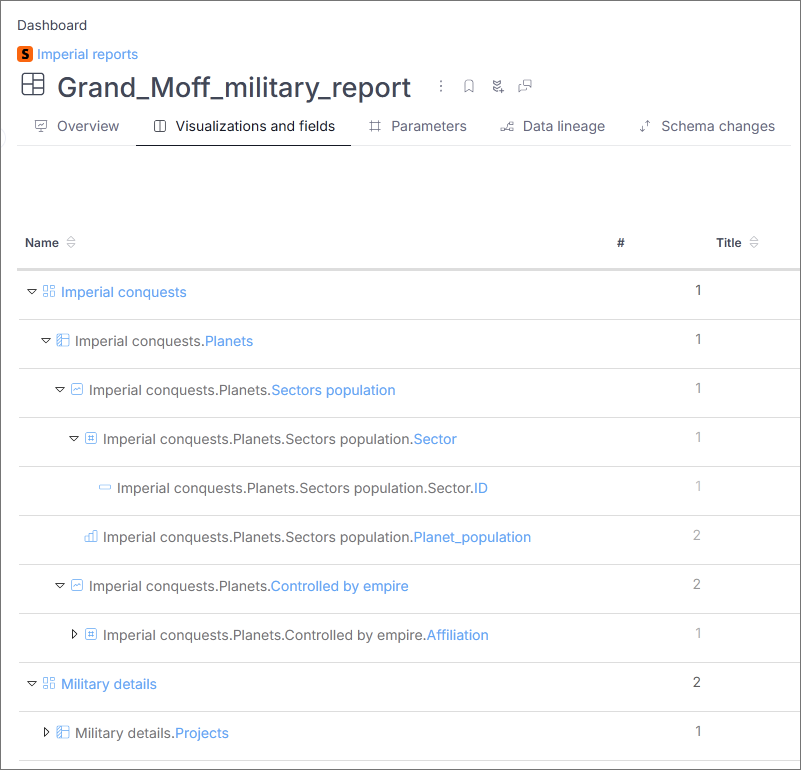
Reports and Datasets are imported with their Attributes and Metrics. Dataedo also supports documentation of Strategy One modeling service by importing Logical Tables with their defined Attributes and Facts. Additionally, information about defined Datasources is represented in Dataedo by Linked Sources. Documents and Cards are currently not supported.
Strategy One connector creates automatic data lineage to enable tracking data flows to visualizations created in the app's pages. Internal column-level lineage is created between Dashboards and Reports, Dashboards and Datasets, Dashboards and Logical Tables, Reports to find out the origin of Attributes and Metrics. External column-level lineage is created between Logical Tables and physical tables from the source database if there is one-to-one correspondence between them which allows tracking the source of the data being transmitted to the modeling service.
Other features include:
- running Data Classification to find potentially sensitive data in Strategy One data fields.
- adding and changing descriptions in Dataedo Portal
- linking Business Glossary entries to any documented Strategy One object
- building lookups for logical tables columns
Connector specification
Supported metadata
- Dashboards (Dossiers)
- Documents
- Reports
- Datasets
- Logical tables
- Datasources
| Imported | Editable | |
|---|---|---|
| Dashboards (Dossiers)-> Dashboards | ||
| Description | ||
| Created date | ||
| Last modified date | ||
| Content Groups (Extended property) | ||
| Subscriptions (Extended property) | ||
| Chapters -> Dashboards(as column subtypes) | ||
| Pages -> Sheets | ||
| Visualizations -> Visualizations | ||
| Attributes -> Attributes | ||
| Forms -> Fields | ||
| Datatype | ||
| Metrics -> Measures | ||
| Computed formula |
| Imported | Editable | |
|---|---|---|
| Documents -> Strategy One Documents | ||
| Description | ||
| Created date | ||
| Last modified date | ||
| Content Groups (Extended property) | ||
| Subscriptions (Extended property) | ||
| Layouts -> Dashboards (as column subtypes) | ||
| Panel Stacks -> Sheets | ||
| Panels -> Sheets | ||
| Visualizations -> Visualizations | ||
| Attributes -> Attributes | ||
| Forms -> Fields | ||
| Datatype | ||
| Metrics -> Measures | ||
| Computed formula |
| Imported | Editable | |
|---|---|---|
| Reports -> Reports | ||
| Description | ||
| Created date | ||
| Last modified date | ||
| SQL statement | ||
| Content Groups (Extended property) | ||
| Subscriptions (Extended property) | ||
| Attributes -> Attributes | ||
| Forms -> Fields | ||
| Datatype | ||
| Metrics -> Measures | ||
| Computed formula |
| Imported | Editable | |
|---|---|---|
| Datasets -> Datasets | ||
| Description | ||
| Created date | ||
| Last modified date | ||
| SQL statement | ||
| Attributes -> Attributes | ||
| Forms -> Fields | ||
| Datatype | ||
| Metrics -> Measures | ||
| Computed formula |
| Imported | Editable | |
|---|---|---|
| Logical tables -> Tables | ||
| Created date | ||
| Last modified date | ||
| Attributes -> Attributes | ||
| Forms -> Fields | ||
| Datatype | ||
| Computed formula | ||
| Facts -> Columns | ||
| Datatype | ||
| Computed formula |
| Imported | Editable | |
|---|---|---|
| Datasources -> Linked sources | ||
| Connection details |
Cards are currently not imported.
Supported features
| Feature | Supported |
|---|---|
| Data profiling | |
| Data classification | |
| Data lineage | |
| Reference data (import lookups) | |
| Importing from DDL | |
| Generating DDL | |
| FK relationship tester |
Data Lineage
| Destination | Source | Column level |
|---|---|---|
| Dashboard | Report | |
| Dashboard | Dataset | |
| Dashboard | Logical table | |
| Document | Report | |
| Document | Dataset | |
| Report | Logical table | |
| Logical table | Source table |
To learn more about automatic data Lineage in Strategy One visit: Strategy One - Automatic data lineage
Known issues and limitations
- Cards are currently not imported
- Linked sources are not guaranteed to have automatically assigned source documentation
- Column-level lineage is not created for metrics that reference other metrics.
- If the logical table is created from several tables using a custom query, lineage to it will not be created.
- External lineage for datasets is not supported

