Apache Parquet
Data Lineage (manual only)ER DiagramsAI AutodocumentationData ClassificationSchema Change TrackingData QualityData ProfilingForeign Key TestingReference DataExtended PropertiesMetadata SyncScheduling tasksExecution Flows
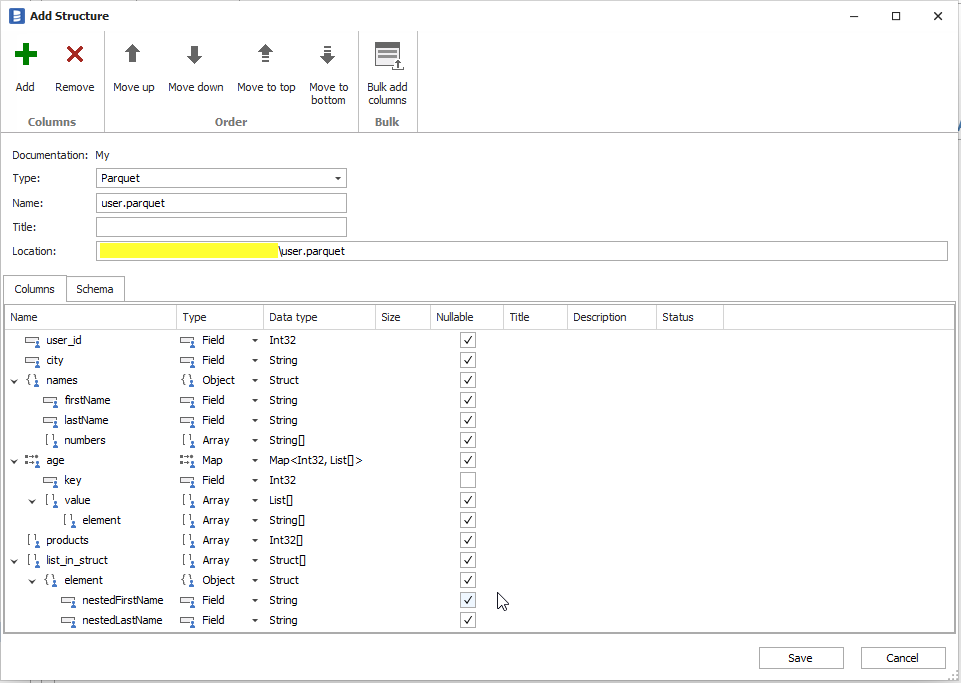
Dataedo 9.3 added support for Parquet files. Dataedo scans Parquet file and builds a structure that includes:
Supported Metadata
Metadata
- Primitive data type fields
- Nested structs
- Arrays
- Maps
Each field contains:
- Name
- Data type
- Nullability
Data profiling
Dataedo does not support data profiling in Parquet files.
How to import Parquet File
To add Parquet file:
- Right-click on any database or Structures folder, choose Add Object, then Add/Import Structure, or
- On the main ribbon select Add Object then Structure/File, or
- Select Structures folder and on the main ribbon select Add Structure/File.
Then select Import from file and PARQUET format. To read the file, point to a PARQUET file on the disk and click Next. This will scan the content and open Structure designer with a parsed structure. You can use this window to edit names, data types and field types and save with Save button.