FTP/SFTP
Data Lineage (manual only)ER DiagramsAI AutodocumentationData ClassificationSchema Change TrackingData QualityData ProfilingForeign Key TestingReference DataExtended PropertiesMetadata SyncScheduling tasksExecution Flows
Dataedo 23.2 introduced a dedicated connector for automatic documentation of FTP and SFTP content.
Connecting to FTP/SFTP
Provide connection details:
- File Protocol - Server protocol type
- Server Name - Provide a server name (host) of your server
- Port - Provide server port
- Username/Password - provide your username and password
- Encryption mode (FTP only) - Choose encryption mode
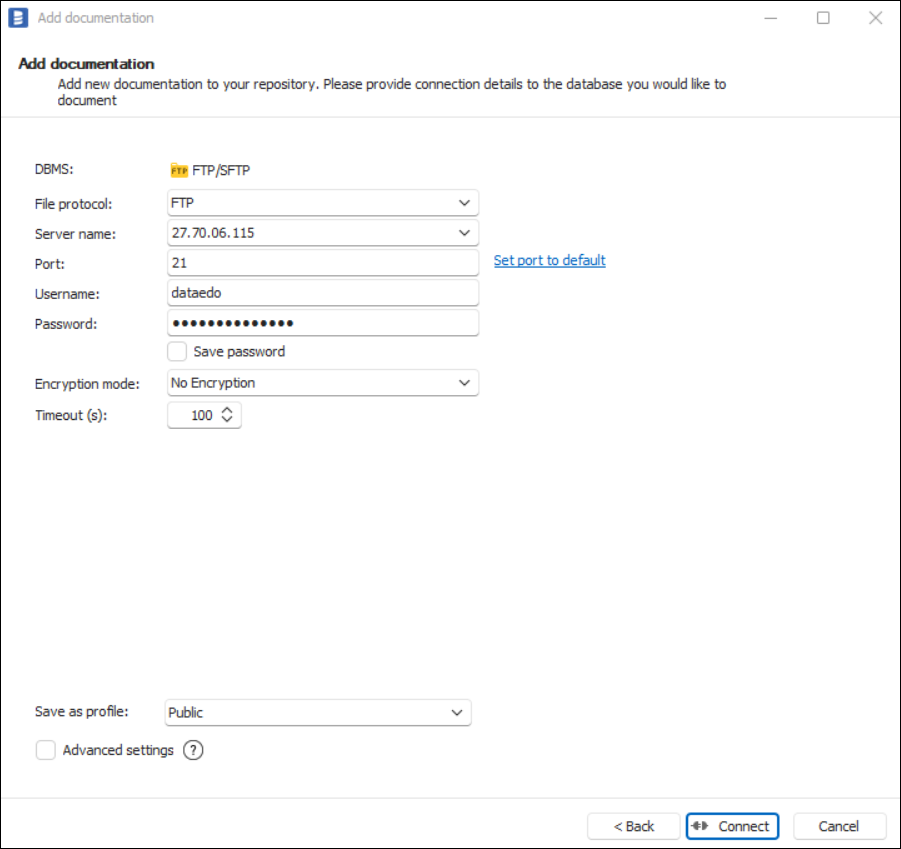
Saving password
You can save the password for later connections by checking the Save password option. Passwords are securely stored in the repository database.
Supported File Extensions
FTP/SFTP connector supports several file extensions:

