Azure SQL Database support
Supported versions
12
May work with 11 but is not officially supported.
Supported schema elements and metadata
-
Tables
- Columns
- Data type with length
- Identity (is identity on)
- Nullable
- Default value
- Computed column specification
- Data lineage*
- Primary keys
- Columns
- Unique indexes
- Columns
- Foreign keys
- Columns
- Triggers
- When triggered
- Script
- Columns
-
Views
- Columns (see tables)
- Script
-
Procedures
- Script
- Parameters
-
Functions
- Script
- Parameters
- Returned value
-
Dependencies
Descriptions & extended properties
Dataedo reads and writes extended properties from/to the following Azure SQL Database objects:
-
Tables
- Columns
- Primary/unique keys
- Foreign keys
- Triggers
-
Views
- Columns
-
Procedures
- Parameters
-
Functions
- Parameters
Data lineage
Dataedo builds Azure SQL lineage using Transact-SQL Parser. Check the capabilities of automatic lineage.
Data profiling
Dataedo supports the following data profiling in Azure SQL:
-
Tables
- Rows count
-
Column distribution
- Distinct values
- Non-distinct values
- Empty
- NULL
-
Numeric columns profile
- Minimum value
- Maximum value
- Average of values
- Variance of values
- Standard deviation
- Span as difference between min and max value
- Number of distinct values
-
String columns profile
- Min value as first string in alphabetical order
- Max value as last string in alphabetical order
- Number of distinct values
-
Date columns profile
- Min value as earliest date
- Max value as latest date
- Span as difference between min and max dates
- Number of distinct dates
-
Top N values
- Top 10/100/1000 popular values
- All values if less than 1000 distinct
- 10 Random values
Read more about profiling in the Data Profiling documentation.
Data Quality
You can check whether data in Azure SQL tables is accurate, consistent, complete, and reliable using Data Quality functionality. Data Quality requires SELECT permission over the tested object.
Limitations
The following schema elements currently are not supported:
- Check constraints
- Non-unique indexes
- Unique indexes on views (planned)
Metadata Sync
Metadata Sync is supported as well. Dataedo creates a two-way mapping between Data Classification and Azure SQL sensitivity labels — the ones behind Data Discovery & Classification in the Azure portal (write-back requires additional privileges).
Azure SQL differs from the tag-based connectors in one structural way: a column carries a single label and there is no tag key anywhere. The label text alone has to carry both the classification and the sensitivity level, which is why the mapping modal has no field for the classification itself.
At a glance
| Dataedo | Azure SQL Database |
|---|---|
Classification (e.g. CCPA) | — nothing directly; implied by the label |
Sensitivity level (e.g. Personal Information) | Sensitivity label on the column, e.g. CCPA - Personal Info |
| Column has classification CCPA = Personal Information | The column's sensitivity classification has LABEL = 'CCPA - Personal Info' |
| Classification removed from the column, or never assigned | Label cleared — never set to an empty string |
| Scope | Columns of tables only, in the connected database |
Prerequisites
- Read — Dataedo reads labels from
sys.sensitivity_classifications, which requires the database-scopedVIEW ANY SENSITIVITY CLASSIFICATIONpermission. Dataedo checks for it explicitly before reading; without it, it skips classification sync for that run and leaves existing Dataedo classifications untouched, rather than mistaking an empty result for "no labels". - Write — Dataedo runs
ADD SENSITIVITY CLASSIFICATION TO … WITH (LABEL = …)/DROP SENSITIVITY CLASSIFICATION FROM …, which requiresALTER ANY SENSITIVITY CLASSIFICATION.
Both permissions are implied by CONTROL on the database. There is nothing to pre-create in the database itself — as far as SQL is concerned, labels are free text. Define them in the SQL Information Protection policy anyway, for the reasons given in Step 1.
The full statement list for every connector is in Metadata Sync → Executors.
Setting up Data Classification
Step 1. Define the labels in your SQL Information Protection policy
The labels Dataedo writes are free text as far as SQL is concerned, but the rest of Azure reads them through the SQL Information Protection policy, held on your tenant root management group (Defender for Cloud → Environment settings → root management group → SQL Information Protection). The policy holds the one thing the Dataedo mapping will need: label names.
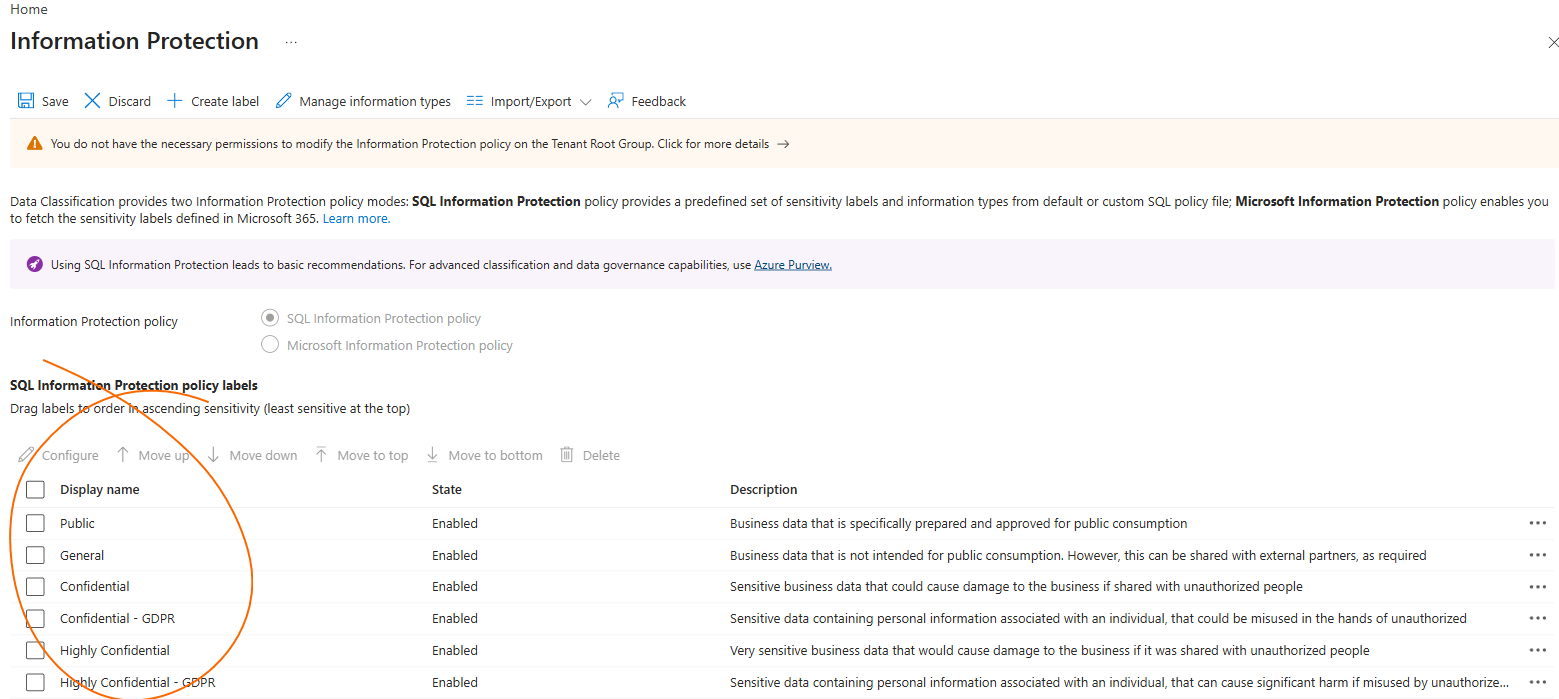
For the purposes of Classification synchronization, you should create one Microsoft Azure label names in the policy, per sensitivity level. They should be identical to the mapped labels on the Dataedo side.
Map to the label names from your SQL Information Protection policy. Dataedo writes whatever label text you type, and Azure does not validate it against the policy — so the mapping is the only place where the two taxonomies meet. Map each level to a label that exists in the policy, spelled identically.
- One taxonomy. The Azure portal, Defender for SQL and SQL Auditing (
data_sensitivity_information) are all organized around the policy's labels. A label written by Dataedo under a name the policy does not know is a second taxonomy that nothing else reads. - No validation at the source. Azure does not check the labels Dataedo writes, so a typo in the mapping lands in the database silently. The policy is the only checklist you have.
Step 2. Map the classifications in Dataedo
Open the data source, go to Metadata Sync → Manage Classification Mapping and select the classifications to synchronize. The modal has two columns — Classification and Mapped Label — and each sensitivity level maps straight to a label:
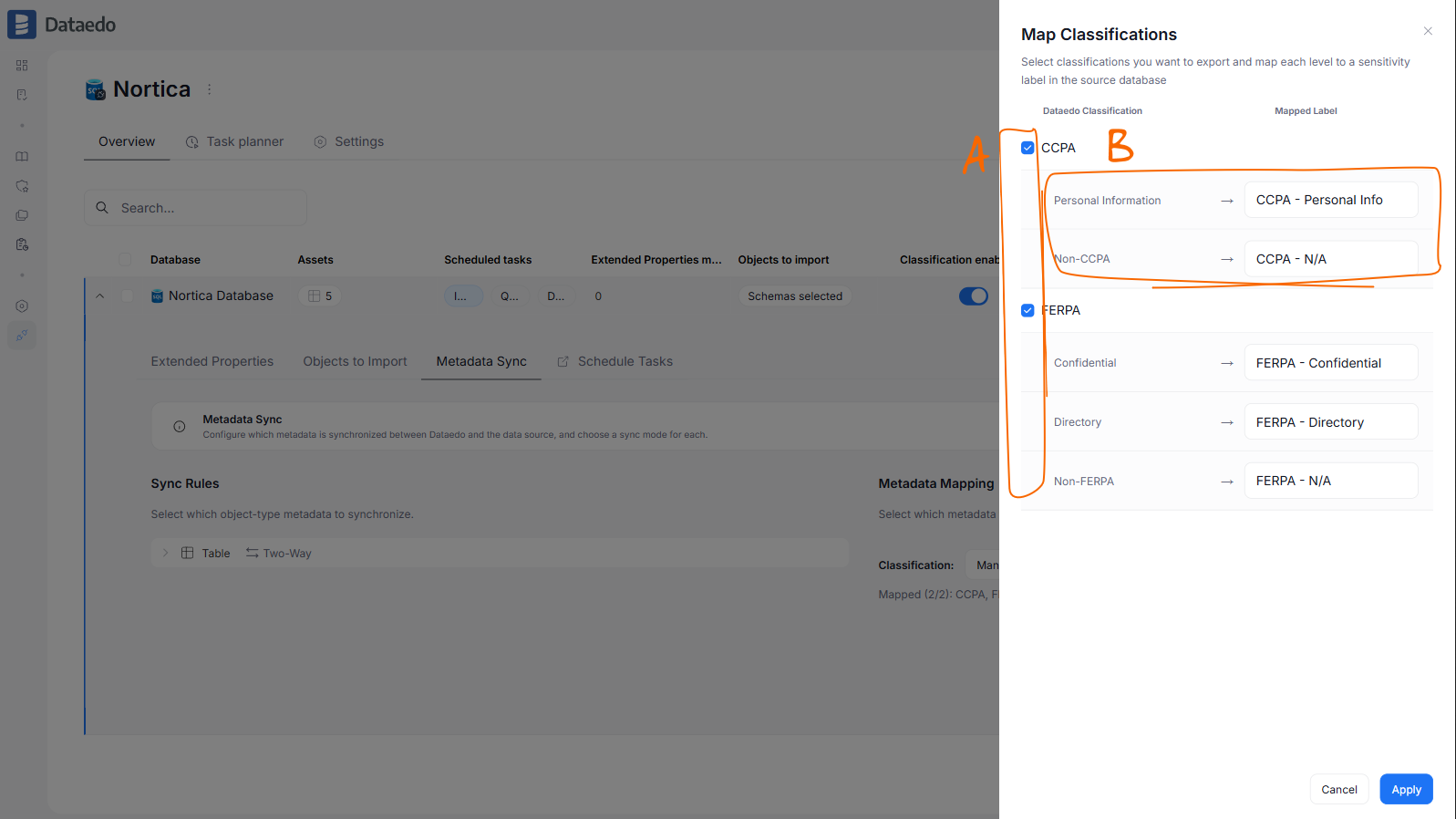
- [A] — checkboxes, used to select Classifications you want to sync.
- [B] — the level rows: each Dataedo sensitivity level and the Azure SQL database label it should correspond to. These should match the policy's label names from Step 1 one for one.
Once you get past this step, you can follow regular Metadata Sync Configuration. One thing differs on Azure SQL: Sync Rules offer Table only, because Azure SQL cannot label view columns.
Good to know
- Dataedo owns the label and nothing else. Information Type and Rank set by a Database admin are read first and written back unchanged; clearing a classification clears only the label.
- Dataedo never overwrites a label it does not recognize. Right before writing, it re-reads the column. If someone changed the label in Azure since the last import, the write is skipped and Sync History shows "the label was changed outside this sync. Not overwriting." The next import picks the new label up and treats it like any other source-side change — a conflict under Two-way, an overwrite under Push.
- Labels are case-sensitive on the Dataedo side.
Confidentialandconfidentialare two different labels to the sync, so a label written in the database in a different case than the mapping surfaces as an unmapped value and blocks the column instead of becoming the level. - Every label in the database is read, not only the mapped ones. There is no tag key to filter by, so Dataedo reads all sensitivity labels, and any label it cannot map is reported as an error row in Sync History on every run. If such a column also carries a synchronized classification, its export is held until the label is mapped or removed. Before enabling the sync, look at the labels already in use (
Public,General,Confidential, …) and either map them or expect one error row per unmapped labelled column per run. - One label slot per column. If two mapped classifications end up on the same column — CCPA and FERPA, say — Dataedo writes neither and reports the column. Drop one of them, from the mapping or from the column, and the next run releases the other automatically.
- The mapping is not checked against the SQL Information Protection policy when you save it. A label outside the policy is stored in the database without an error on either side. Copy the policy's label names into the mapping modal 1:1, same spelling and same case.
- A label maps to exactly one classification and level.
Confidentialcannot be a level of both FERPA and CCPA; the modal rejects it. This follows from the label being the only key.
Metadata Sync limitations
- tables only — Azure SQL cannot label view columns, so View is not offered in Sync Rules
- description sync is not available; classifications only
- Information Type and Rank have no counterpart in Dataedo. They are left untouched in Azure, but are not imported
- Azure SQL Database only — the SQL Server (on-premises) and Managed Instance connectors do not support Metadata Sync
The rules that hold for every connector — blocked mapping gaps, Dry Run, and when writes actually happen — are described under Classification sync rules.
Required access level
Importing database schema requires a certain access level in the documented database. The user used for importing or updating schema should at least have "View definition" permission granted on all objects that are to be documented. "Select" also works on tables and views.
Table data is never read during a schema import, therefore no "Select" or "Execute" grant is needed for it.
Schema import itself does not alter the database. Two features write to it, and each needs its own permissions on top of the read access above:
- Descriptions are written as extended properties, which requires
ALTERon the objects being described. - Metadata Sync reads and writes column sensitivity labels, which requires the database-scoped
VIEW ANY SENSITIVITY CLASSIFICATIONandALTER ANY SENSITIVITY CLASSIFICATIONpermissions. Both are implied byCONTROLon the database.
GRANT VIEW ANY SENSITIVITY CLASSIFICATION TO [dataedo_user];
GRANT ALTER ANY SENSITIVITY CLASSIFICATION TO [dataedo_user];
The following objects are accessed during the schema import process:
- INFORMATION_SCHEMA.COLUMNS
- INFORMATION_SCHEMA.KEY_COLUMN_USAGE
- INFORMATION_SCHEMA.PARAMETERS
- INFORMATION_SCHEMA.REFERENTIAL_CONSTRAINTS
- INFORMATION_SCHEMA.ROUTINES
- INFORMATION_SCHEMA.TABLES
- INFORMATION_SCHEMA.VIEWS
- sys.columns
- sys.extended_properties
- sys.indexes
- sys.index_columns
- sys.procedures
- sys.sensitivity_classifications
- sys.sql_expression_dependencies
- sys.sql_modules
- sys.tables
- sys.views
- sys.all_objects
- sys.objects
- sysobjects
- sysusers

