Databricks Unity Catalog support
Starting from Dataedo 25.3, to connect to Databricks it is required to provide SQL Warehouse name that will allow to execute SQL queries via Databricks API. The compute resources of this warehouse will be used in Data Profiling and Data Quality modules and to retrieve data lineage faster using system tables. To import column lineage, the following privileges are now required: USE SCHEMA on system.access schema and SELECT on system.access.column_lineage table.
Databricks is a data processing cloud-based platform. It simplifies collaboration of data analysts, data engineers, and data scientists. Databricks is available in Microsoft Azure, Amazon Web Services, and Google Cloud Platform.
Dataedo will connect to a single catalog Unity Catalog via API, and document objects and data lineage within the connected catalog.
Instructions on how to connect to Databricks using Dataedo can be found at: Connecting to Databricks Unity Catalog
Connector features
| Schema | Lineage | Profiling | Data Quality | Classification | Export comments | PK/FK tester | Metadata Sync |
|---|---|---|---|---|---|---|---|
Read more about Automatic Data Lineage in a Databricks automatic data lineage documentation.
Read more about Profiling in a Data Profiling documentation
Read more about Data Quality in a Data Quality documentation
Read more about PK/FK Tester in a Testing Primary/foreign keys
Data Catalog
Dataedo will document the following objects and their respective properties from Databricks:
| Name | Metadata | Lineage | Dataedo type |
|---|---|---|---|
| Delta Live Tables | Table/View | ||
| Pipelines | ETL Program | ||
| Tables | Table | ||
| Views | View | ||
| Columns | Object column | ||
| External locations | Linked source | ||
| External Tables | External table | ||
| Primary keys | Primary Key | ||
| Foreign keys | Relation | ||
| Urls | Object property |
Documentation is created for one selected catalog from Databricks Unity Catalog.
Metadata Sync
Metadata Sync is supported as well. Dataedo creates a two-way mapping between Data Classification and Unity Catalog's column tags, and keeps table and column descriptions in step (write-back requires additional privileges).
On Databricks, a Dataedo Classification becomes a column tag: the classification is the tag key and the sensitivity level is the tag value.
At a glance
| Dataedo | Databricks Unity Catalog |
|---|---|
Classification (e.g. CCPA) | Column tag key (e.g. CCPA) |
Sensitivity level (e.g. Personal Information) | Column tag value (e.g. Personal Information) |
| Column has classification CCPA = Personal Information | Column has tag CCPA = Personal Information |
| Classification removed from the column, or never assigned | Tag unset (UNSET TAGS ('CCPA')) — not set to an empty value |
| Scope | Columns of tables and views in the connected catalog |
Prerequisites
- Read — Dataedo reads column tags from
system.information_schema.column_tags, which only returns rows for columns the connection can already see, so it needs no privilege beyond those the import already requires. - Write — Dataedo runs
ALTER TABLE … ALTER COLUMN … SET TAGS/UNSET TAGS, which requiresAPPLY TAGon the table or view (or ownership of it), plusUSE CATALOGandUSE SCHEMA. - Write with a governed tag — additionally
ASSIGNon the tag policy for the connection's principal. Without itSET TAGSfails and the run reports the column.
The full statement list for every connector is in Metadata Sync → Executors.
Setting up Data Classification
Step 1. Create the tag policies in Databricks
Create one tag policy per classification, with the allowed values listing exactly the values you intend to map to sensitivity levels. In Databricks, you can review the result under Catalog → Govern → Governed Tags. A tag policy holds the two things the Dataedo mapping will need:
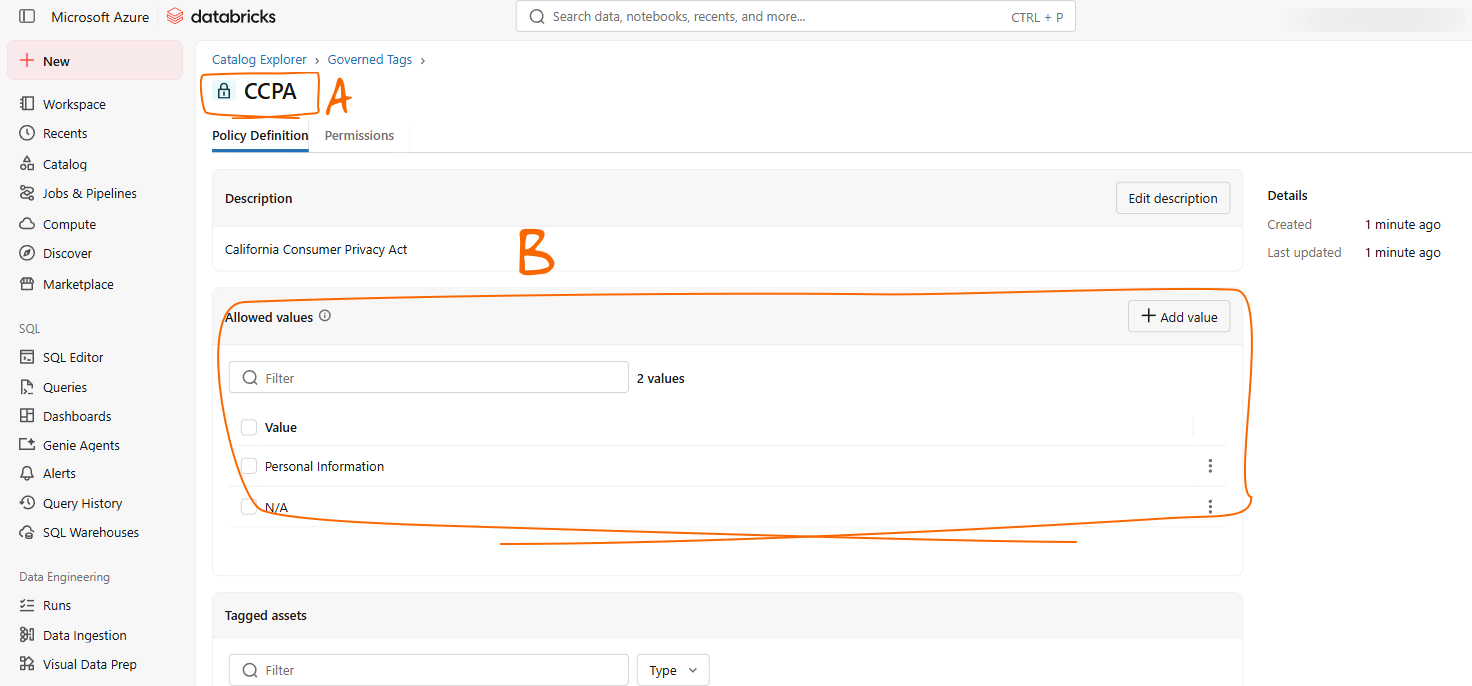
- [A] — the tag policy key. You will use this name to map your classification in Dataedo
- [B] — the Allowed values list, one entry per sensitivity level
Dataedo works with any Unity Catalog tag, but we recommend mapping classifications to governed tags (tag policies) rather than free-form tags:
- Validation at the source. A governed tag with Allowed values accepts only the values in your mapping, so a tag applied by hand with a typo is rejected by Databricks instead of reaching Dataedo as an unmapped value that blocks the column.
- Permissions. Only principals with
ASSIGNon the tag policy can apply the tag, so the classification is protected like data rather than like a comment. - Downstream use. Unity Catalog attribute-based access control — row filters and column masks driven by tags — works with governed tags only.
Step 2. Map the classifications in Dataedo
Open the data source, go to Metadata Sync → Manage Classification Mapping and select the classifications to synchronize. The popup you see has the following fields:
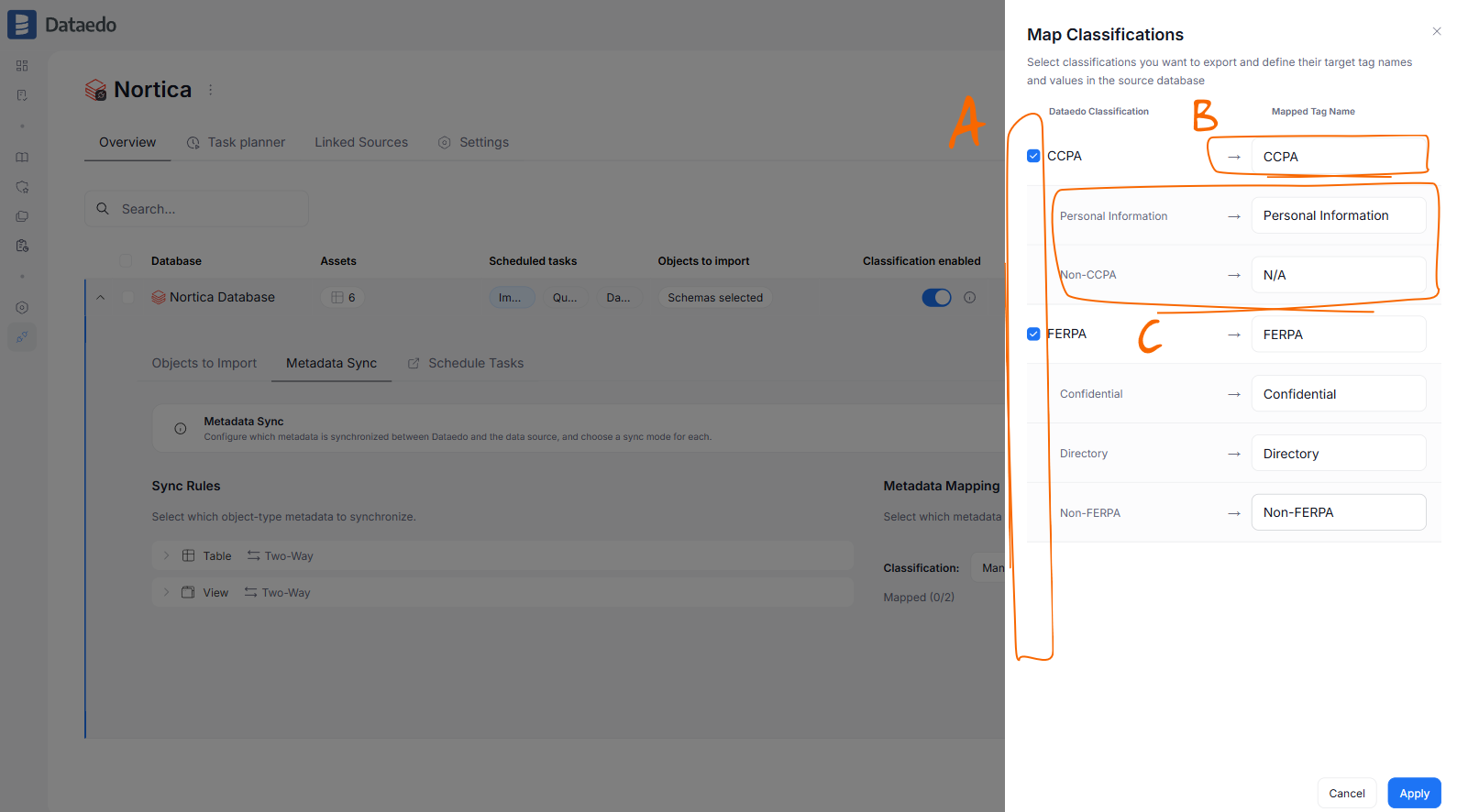
- [A] — checkboxes, used to select Classifications you want to sync.
- [B] — Mapped Tag Name: Tag key that should correspond to Dataedo classification. If using a governed tag (recommended), it has to be the policy key you created in step 1, spelled and cased identically.
- [C] — the level rows: each Dataedo sensitivity level and the tag value it becomes. With a governed tag, these should match the policy's Allowed values one for one.
Once you get past this step, you can follow regular Metadata Sync Configuration.
Good to know
- Only tags whose key is mapped are read. Any other column tag in Databricks is ignored and never touched. Several classifications on one column are fine — each one becomes its own tag.
- Tag keys and values are case-sensitive on both sides. Unity Catalog treats
Salesandsalesas two distinct tags, and Dataedo compares exactly as well. A tag applied in Databricks asccpa = personal informationdoes not match a mapping typed asCCPA/Personal Information; it surfaces as an unmapped value and blocks the column instead of becoming the level. With a governed tag, a Mapped Tag Name in the wrong case misses the policy entirely — the sync writes a separate free-form tag with a similar name. - The mapping is not checked against a governed tag's Allowed values when you save it. A mapped value outside the list fails only at sync time, per column, as an error row in Sync History. Copy the allowed values into the mapping modal 1:1, same spelling and same case.
- Object limits. Unity Catalog allows at most 50 tags per securable and 1,000 column tags per table. A wide table with many mapped classifications can reach the second limit.
- The tag key must be unique across mapped classifications; the modal rejects duplicates.
- Within one classification, each level needs its own tag value. The modal rejects two levels mapped to the same value, because when Dataedo reads that value back from Databricks it cannot tell which level to assign.
The rules that hold for every connector — blocked mapping gaps, Dry Run, and when writes actually happen — are described under Classification sync rules.
Known Limitations
Documentation Functionality
- For pipelines, Dataedo will discover only the name, not the script.
Lineage Functionality
- Column level lineage for external tables will be created only if the data source (for example JSON file) schema is automatically discovered by Databricks and column names are not changed.
Metadata Sync
- Classification sync is column-level only; tags on the table or view itself are not synchronized.
- Classification on objects other than tables and views, such as pipelines, is not synchronized.
- Unity Catalog connector only — the Databricks Hive Metastore connector has no Metadata Sync.

