Workflows and Steward Hub for Domains
Your Domains and Areas can be moved through different workflow stages, to properly represent their process from conceptualization to publication. This also affects which Users can view certain Domains.
Before using this feature, make sure that your Workflow process is properly configured and you understand the basic workflow principles
Workflow management
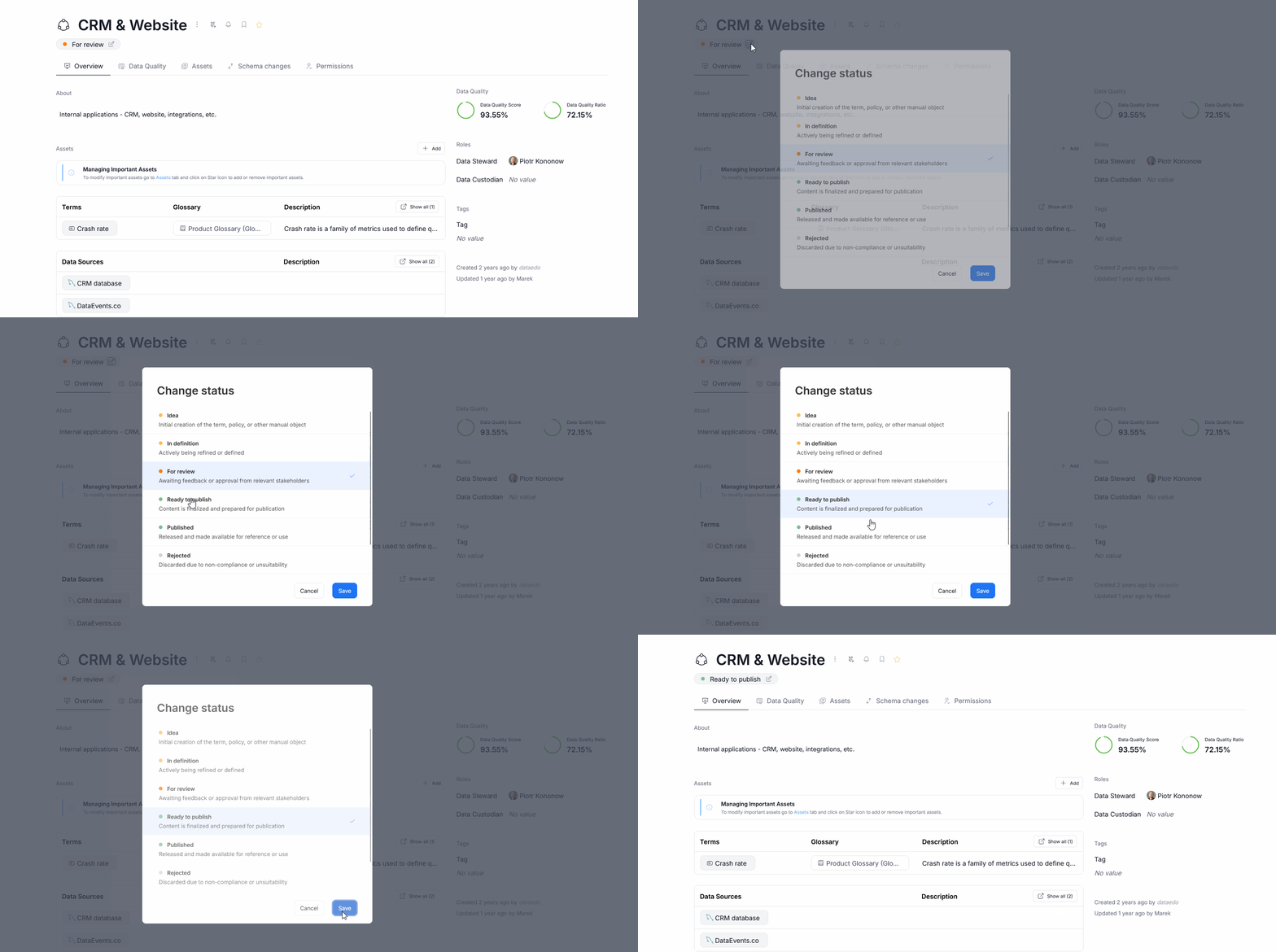
When you first create a Domain or an Area it will be set in the first stage of workflow (Idea if using Dataedo standard configuration). You can move the object to the next stage by pressing the Workflow icon and selecting your desired stage.
There is an asymmetric interaction pattern between workflows and domains, regarding the visibility of objects to Viewers within a Domain itself.
Whereas usually an object's visibility is dependent solely on its own workflow status, Domains can overwrite this behavior. When a Domain or Area is in workflow stage that is not visible to users, none of the objects linked to it will be shown to users either. In contrast, even when a Domain is visible to users, if one of its objects is not, the Domain will still be visible to viewers (but the object won't). In practical examples:
- If a Term with Published status is linked to a Domain with In review status, neither the Term nor the Domain will be visible to viewers
- If a Term with Published status is linked to a Domain with Published status, both will be visible to viewers
- If a Term with In review status is linked to a Domain with Published status, only the Domain will be visible
- If a Term with In review status is linked to a Domain with In review status, neither will be visible to viewers
- If a Domain is In review status has an Area (child Domain) with Published status, neither will be visible.
Remember that these interactions apply only in the Scope of a Domain. Even when a published Term is not visible to users in a In Review Domain, when users get access to that same Term through a Dictionary, they will be able to view it that way
Workflow in Areas
Visibility of Areas is dependent not only on their own status, but also on the status of the Domain/Area they are a child of. This means, that an Area with a Published status might still not be visible to Viewers, if the Domain it belongs to is still In review (or any other workflow status that is not visible to Viewers).
Steward Hub
Steward Hub, Dataedo's feature helping you manage and document your metadata, offers modules meant specifically for Data Domains and Business Domains.
The two main features enabled by those modules are:
- mass Workflow actions edition
- mass linking of objects.
The Workflow actions editor works by grouping all Domain assets in your accessible Domains that are in Workflow stages requiring user action. You can view these assets, and modify their statuses either individually or in bulk.
The suggested objects to link are derived based on the contents of your repository. If an object currently is not linked to any Domain, it will be shown as a suggestion.
Since the Steward Hub actions require edit privileges, it is accessible only to Data Stewards, Power Data Stewards, and Approvers.
You can read more in the dedicated Steward Hub articles for Business Domains and Data Domains.

