Metadata Synchronization
Currently, this feature is supported for Databricks (Unity Catalog), Snowflake and Azure SQL Database connections.
Dataedo's Metadata Sync feature allows for two-way synchronization of Data Classification and descriptions between your data source and Dataedo. This approach has two benefits. First, it reduces work across your organization by keeping Classifications and descriptions consistent between Dataedo and your data source. This ties directly into the second benefit: Dataedo can become a single source of truth for your data. You can use it to manage, review, update, and resolve conflicts in one place, while still ensuring that those changes stay consistent across your sources.
Configuration
Metadata Sync has to be enabled individually for each data source. To do so, head to Connectors > Connections and open the relevant data source. Find the Metadata Sync toggle and enable it.
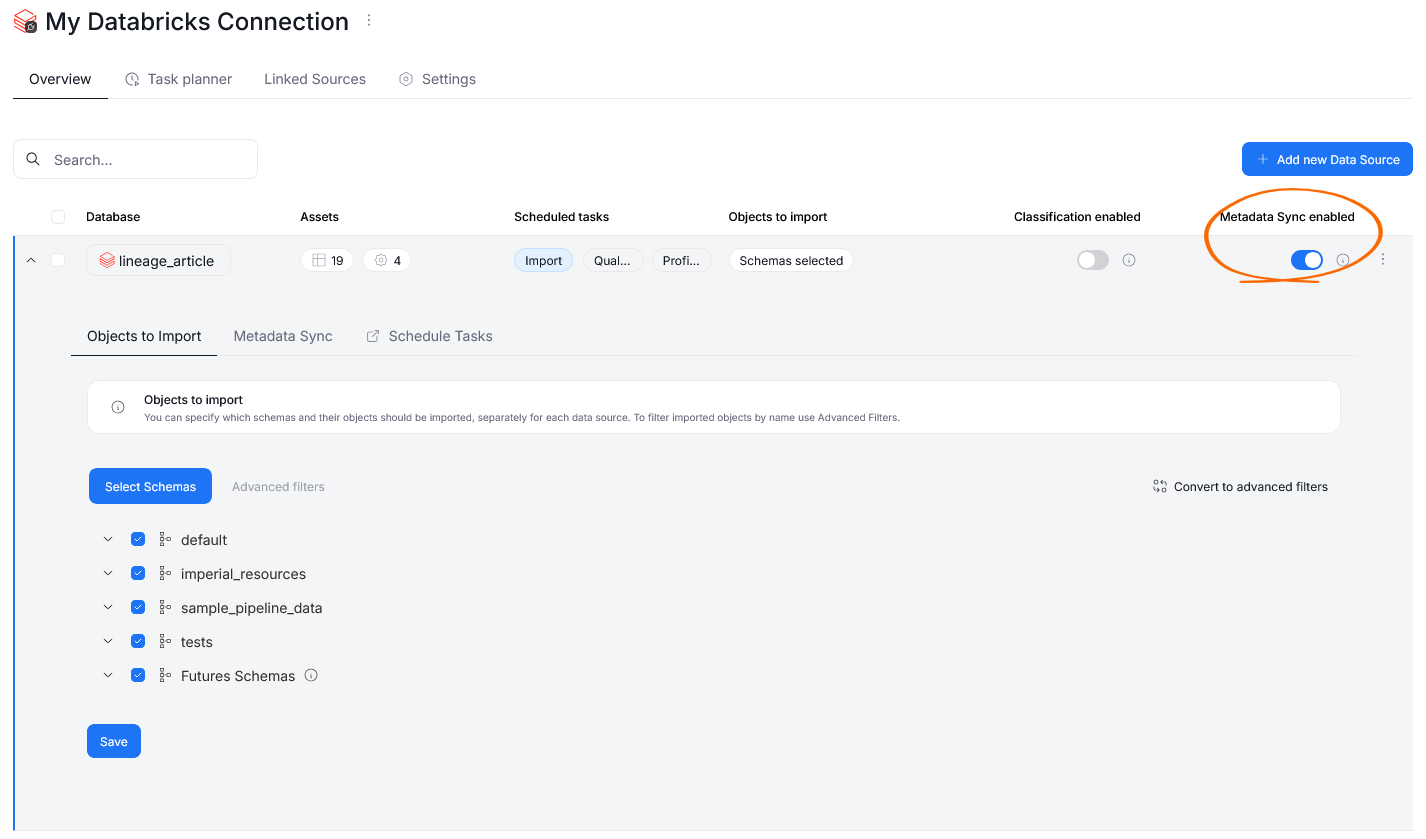
Afterwards, you can open the data source's Metadata Sync section to set up the exact mechanisms governing the synchronization.
Sync rules and conflict resolution
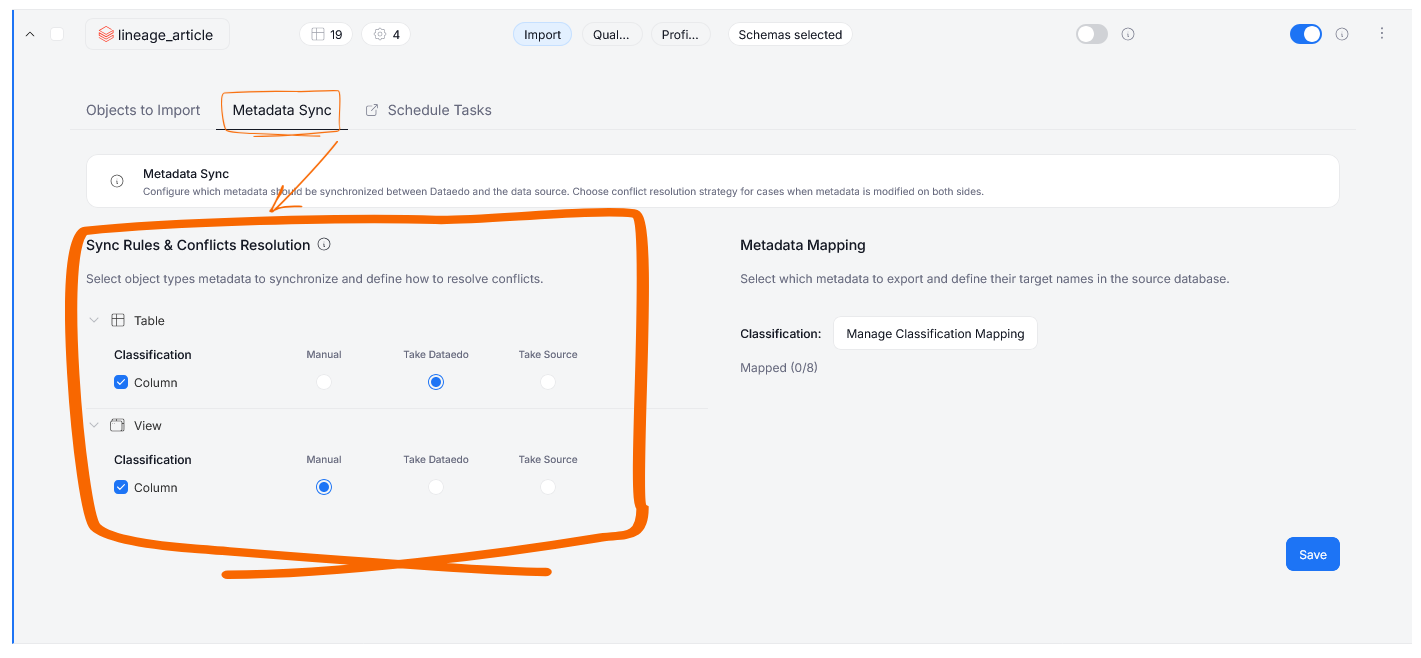
The Sync Rules section allows you to determine how your metadata is maintained between Dataedo and your original data source. Conflicts (situations where there are clashing changes in Dataedo and your original source) will be resolved for each situation. You can define this behavior separately for each feature supported by Metadata Sync: column Classification, table descriptions and column descriptions. The available sync rules are:
-
Two-way — changes are updated two-ways. If a value has been changed in your original data source, it will also be overwritten in Dataedo; if a value has changed in Dataedo it will also be overwritten in the data source. In a situation where changes have been made both in Dataedo and the source, you will have to decide which value is propagated in the Steward Hub.
-
Push — value changes from Dataedo are always pushed to your data source.
Metadata Mapping
If you change a source's sync mode from two-way to push all pending conflicts in Steward Hub will be automatically resolved in favor of Dataedo during the next metadata import run. Also, all changes, even those previously set to match the source, will be overwritten.
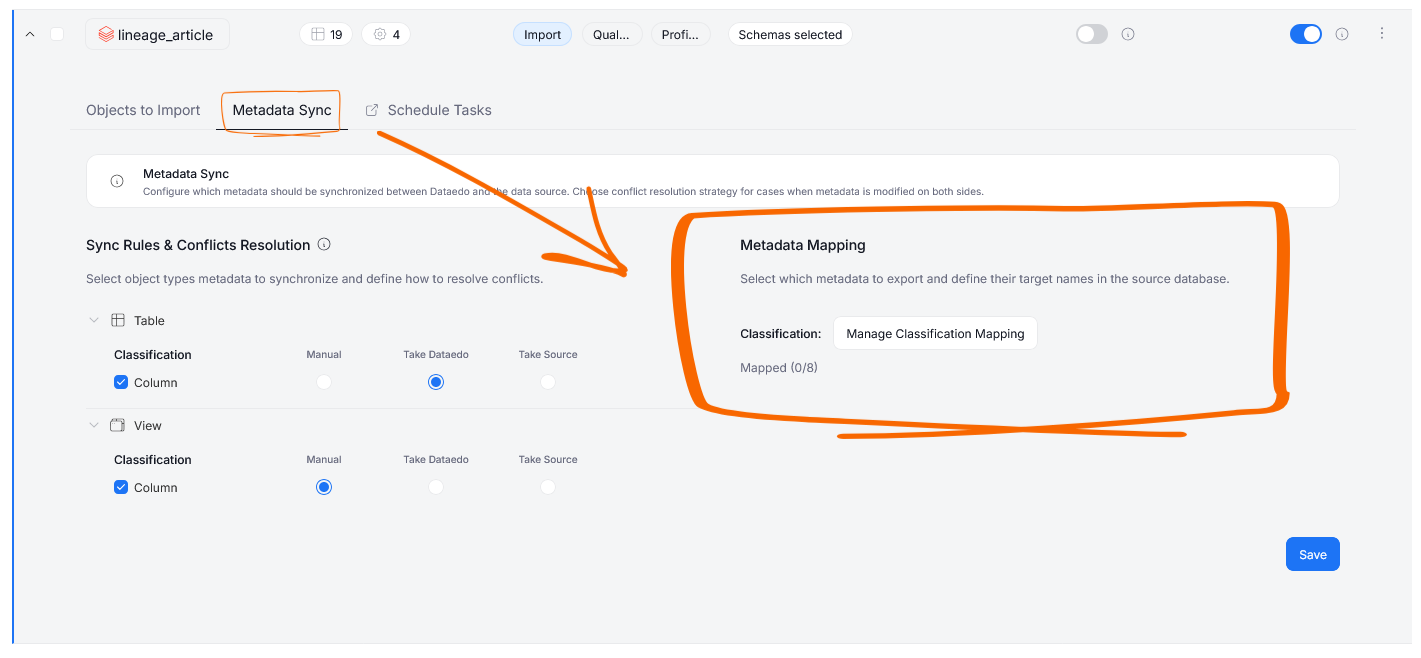
In the Metadata Mapping section, you can map Classifications from your Dataedo repository onto tags and their values in your data source.
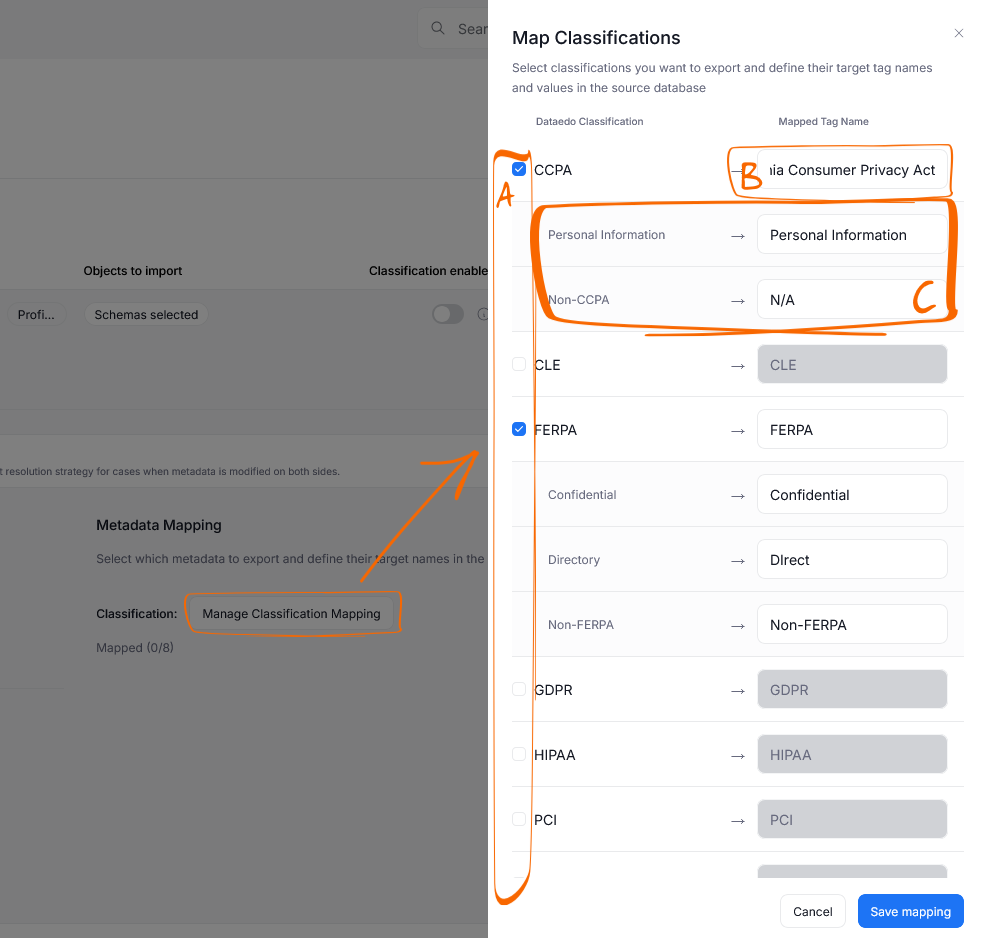
When you click the Manage Classification Mapping button, you will access a mapping menu. There you can select which Dataedo Classifications you want to map using checkboxes [A]. For each mapped Classification, you have to provide the corresponding Tag Name (or label if using Azure SQL) [B] in your data source. The Tag Name has to match what your source expects exactly, letter case included. Finally, you can provide the Tag Values [C] that will correspond to your Classification's sensitivity levels.
The set-up above is not fully universal, and can differ slightly between sources. You can find detailed instructions on each connector's page:
Once you save the configuration, the sync will be enabled and will take effect from the next Metadata (re)import onward.
Import Settings
When editing or scheduling an Import Task, you have the option to additionally define the behavior of a Metadata Sync.
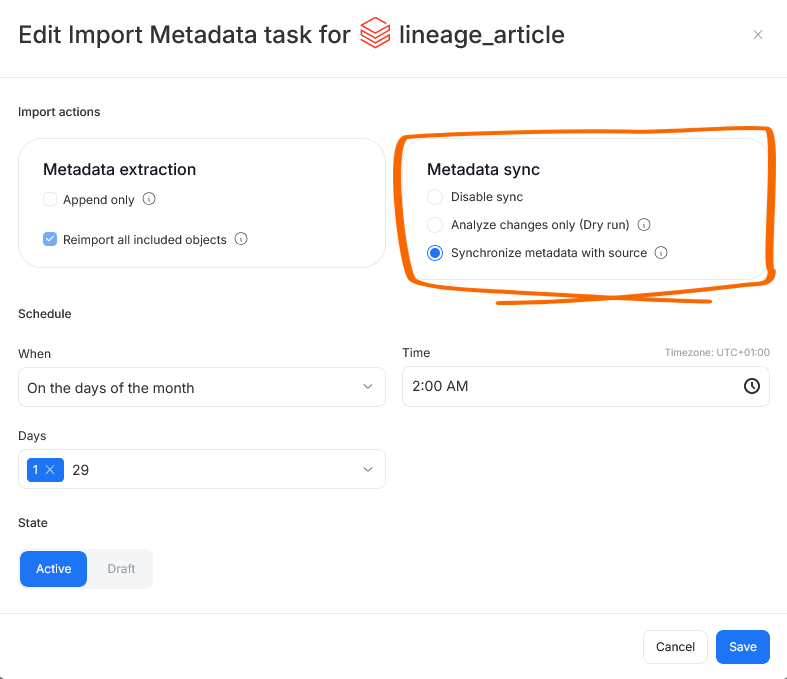
Choosing Disable export prevents any metadata sync-related actions, even if the feature is enabled in the source configuration.
Analyze changes only enables a Dry Run. In Dry Run mode, changes and conflicts between your data source and Dataedo are analyzed and returned as a report within Dataedo, but no changes are pushed to your data source directly. This is a great option for data-sensitive organizations — you still receive a summary of changes that should be propagated to your original data source to match your Dataedo documentation, while preventing any automated modifications at the source. All changes can instead be reviewed and manually applied by your team.
Synchronize metadata with source gives Dataedo permission to push changes to your data source in accordance with the chosen conflict resolution protocol.
How it works
The Metadata Sync process can be broken down into steps.
First, during a Metadata Import, Dataedo checks the current state of tags and descriptions in the data source and compares:
- information in the source before import
- information in Dataedo
- information in the source after import
This comparison enables a detailed analysis of changes to classification tags and identifies where those changes originated — either in the source or in your Dataedo repository.
The second step takes place immediately after a Metadata Import. Any changes made either in Dataedo or in your data source since the last reimport, as well as the changes kept after using the chosen conflict resolution protocol are gathered and pushed back to your data source and Dataedo, if you chose Synchronize metadata with source.
If Dry Run is configured, however, changes will not be pushed. Instead, a complete report of what would be pushed becomes viewable in history.
Classification sync rules
The general classification sync rules are the same for every connector:
- Column-level only. Classification sync covers column classifications. Table-level classification is not synchronized.
- Any classification that is not selected in the mapping is ignored — it is not pushed, not pulled and not reported.
- Synchronization works only during an import run. Assigning a Classification in Portal changes nothing in the source until a scheduled import task with Synchronize metadata with source runs.
- Values are compared exactly, including letter case. A tag value or label that differs only in case is a different value on every connector.
Mapping conflicts
When Dataedo cannot match a tag or a label in a data source to the mapped Classification in Dataedo, it will skip it and return an error rather than guessing. This can happen when:
- the source holds a tag or label value that is not mapped to any Dataedo Classification level
- a Classification level on an asset's metadata in Dataedo is not in the mapping
A blocked row does not appear among the Steward Hub conflicts. Once you fix the mapping and re-run the sync, it returns automatically — there is no state to clean up.
The most common way to create such a gap is to change a mapped value — its text or just its letter case — after columns were already synchronized. The tags or labels sitting in the source still carry the old value, so every one of them becomes unrecognizable at once. Either restore the mapping or correct the values in the source.
Turning Classification sync off
If you remove a classification from the mapping, this will not delete the classification in Dataedo. Instead, Dataedo stops tracking further changes.
The way to turn Classification sync off is by removing the last mapping, or disabling Classification for every object type in Sync Rules. Old tracking records are not cleaned up until at least one mapping is back.
Lossy descriptions
Because descriptions are synchronized to the source as Markdown, some rich-text formatting features from Dataedo cannot be fully represented in your data source. These include: text color, font size, highlight, underline, banner color, user mentions, images, checklists, link previews, and merged or styled table cells.
How Dataedo handles this depends on your sync rule:
-
Two-way — a description containing lossy formatting is blocked from export. The description is not pushed to the source, and the run is reported as an error in history with the offending description named. When editing such a description in Portal, the lossy parts are highlighted and a banner appears. That banner offers a review modal where you can compare the original against its "safe", modified version (and apply changes with a single click). Once the description no longer contains lossy formatting, it exports normally on the next sync. All descriptions blocked for this reason across your repository are also collected in one place in the Steward Hub, where you can review and fix them without having to find each object individually.
-
Push — the export is not blocked. The description is pushed in a degraded form (Markdown without the unsupported formatting).
History
Each Metadata Import run followed by a Metadata Sync leaves behind an audit log. You can find these in the connection view, under the Sync History tab.
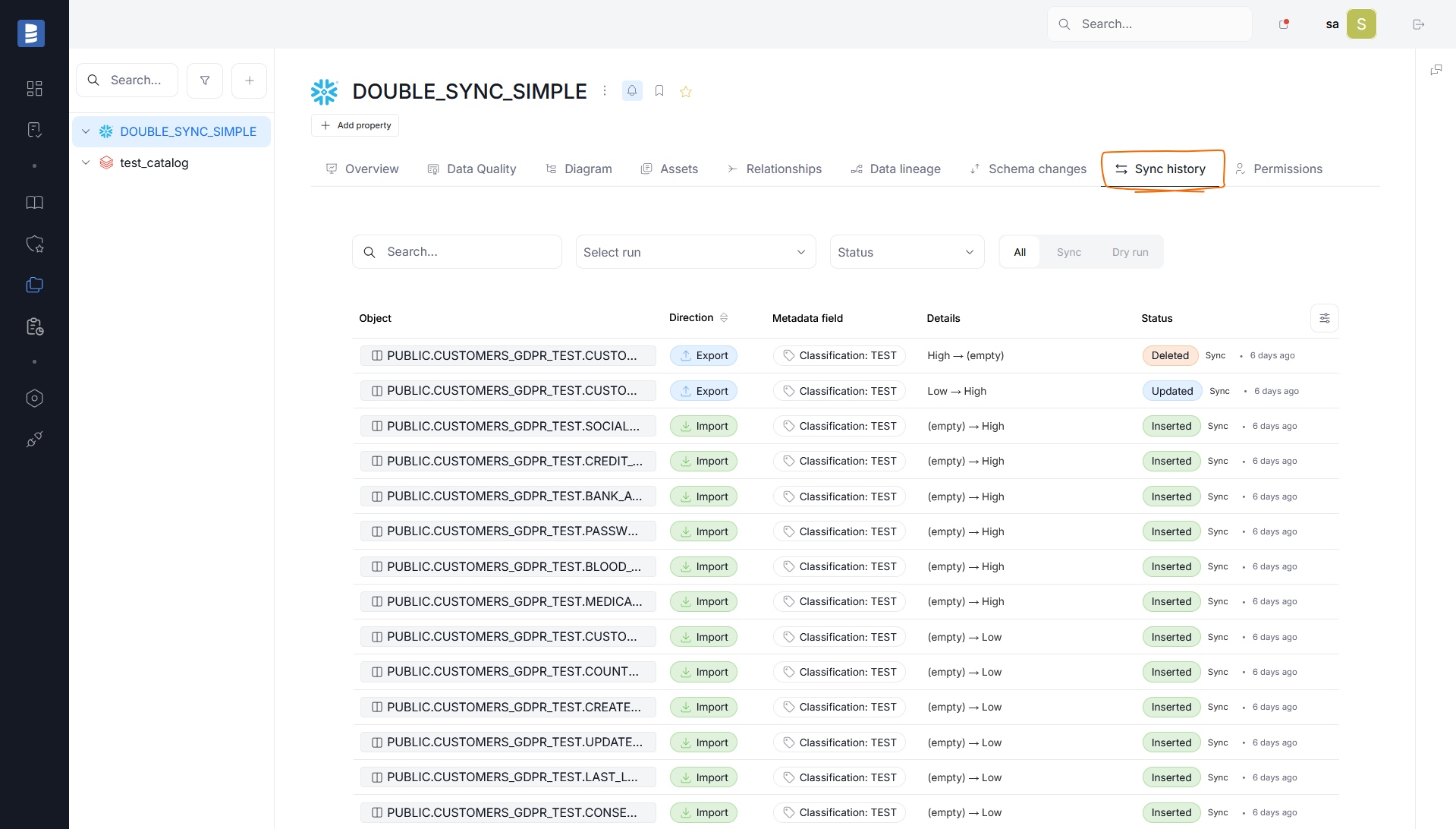
History shows an overview of each change and its resolution. You can see which object received the change, the details of the change, and the change's type — whether a Classification tag or a description was added, deleted or edited as a result.
By default, history is cumulative, showing an overview of all changes made to the source since the Metadata Sync was enabled. You can, however, filter the results by:
- status
- type (Metadata Synchronization or Dry Run)
- keywords (using the search bar)
Finally, the Select run field allows you to choose a specific Import Task followed by a Metadata Sync, to see changes that were made only during that particular task.
Steward Hub
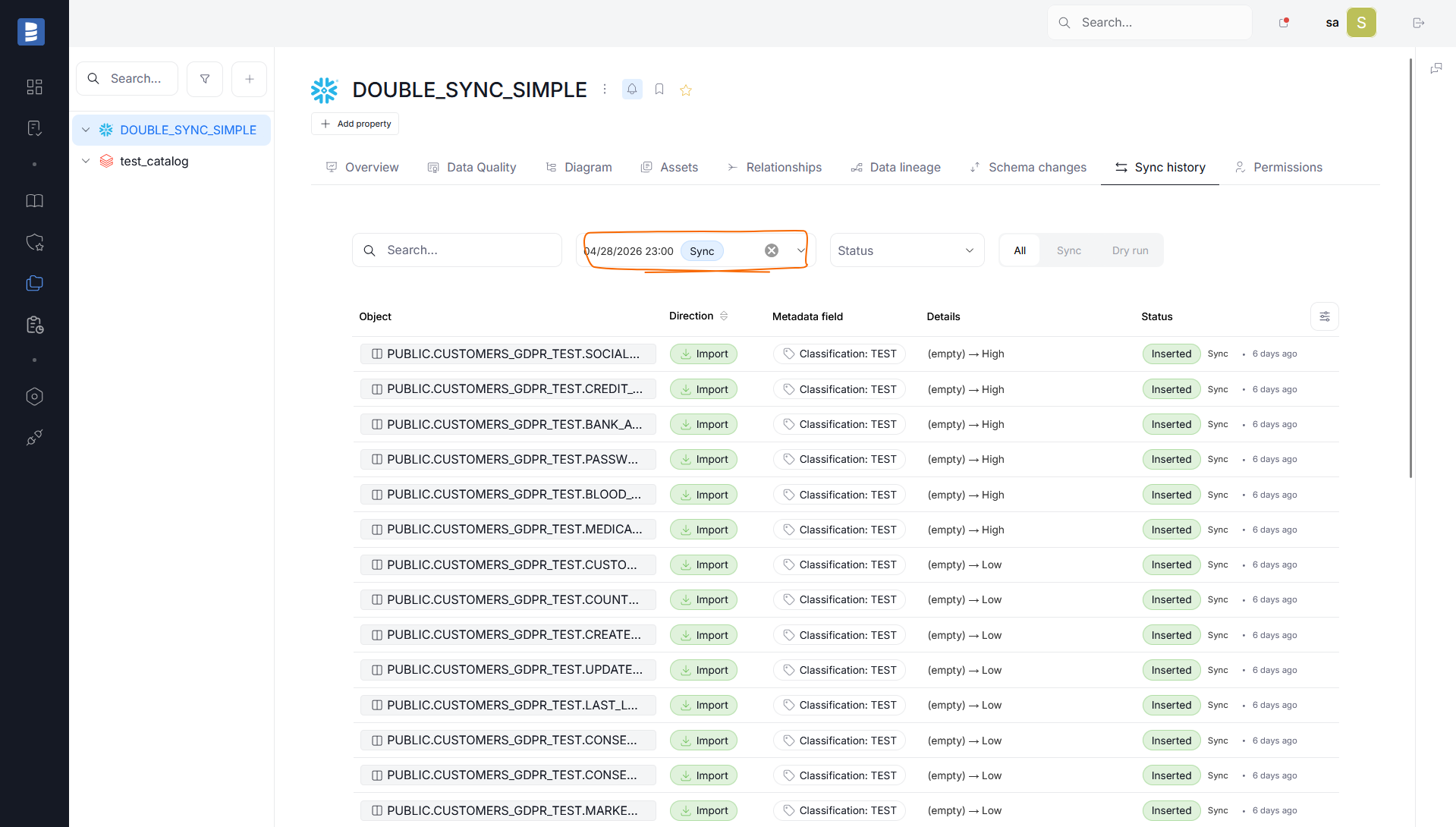
If you set sync rules to two-way, you will have to resolve conflicts yourself before the Metadata Sync takes place, and you may also need to fix descriptions blocked due to lossy formatting. Both of these can be done using Steward Hub's Metadata Sync module.
Each change is shown as a separate row in a grid. In each row you can:
- see which object has the conflict [A]
- see which metadata field is changing [B]
- see the sensitivity level set in Dataedo and in your data source [C]
- decide whether the Classification from Dataedo or the data source should be kept [D]
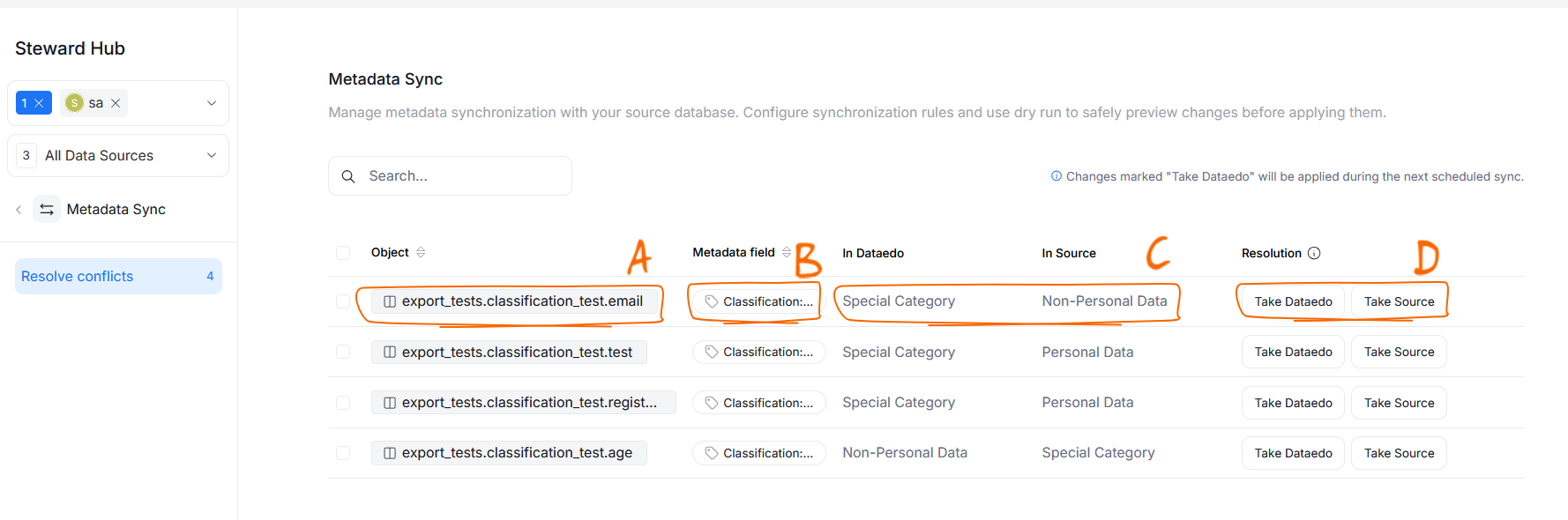
Conflicts resolved as Take Source will be immediately propagated onto Dataedo, while those resolved as Take Dataedo will be pushed to your source only during the next scheduled Metadata Sync.
Technical Specs
Metadata Sync as a feature currently supports column-level Classification as well as table and column descriptions.The scope is slightly different for each connector, however, for more details see technical specs.
Executors
After a Metadata Import, changes are applied to the source using a connector-specific executor:
| Connector | Classification | Description |
|---|---|---|
| Databricks (Unity Catalog) | ALTER TABLE … ALTER COLUMN … SET TAGS (…) / UNSET TAGS (…) | COMMENT ON TABLE / COMMENT ON COLUMN |
| Snowflake | ALTER TABLE/VIEW/ICEBERG … ALTER COLUMN … SET TAG / UNSET TAG | COMMENT ON TABLE / COMMENT ON VIEW / COMMENT ON COLUMN |
| Azure SQL Database | ADD SENSITIVITY CLASSIFICATION TO … WITH (LABEL = …) / DROP SENSITIVITY CLASSIFICATION FROM … | not supported |
Classification model
A Dataedo Classification has two parts — the classification itself and its sensitivity levels — and each connector splits those two parts across its own native concepts. That split is what makes the mapping modal look different from source to source.
| Databricks (Unity Catalog) | Snowflake | Azure SQL Database | |
|---|---|---|---|
| Source concept | Unity Catalog column tag (key = value) | Snowflake tag object set on a column (DB.SCHEMA.TAG = value) | Sensitivity classification row on a column (label) |
| Keying model | Tag-keyed: the tag key identifies the classification, the tag value identifies the level | Tag-keyed: the fully qualified tag name identifies the classification, the tag value identifies the level | Value-keyed: the label alone identifies both classification and level (no tag key exists) |
| Dataedo Classification maps to | Tag key (any string) | Tag name in DATABASE.SCHEMA.TAG_NAME form | — nothing; the classification is implied by the label |
| Dataedo sensitivity level maps to | Tag value | Tag value | Label text |
| Several mapped classifications on one column | one tag per classification | one tag per classification | one label slot per column — two mapped classifications on one column block the export |
| Objects | Tables, views (columns) | Tables including external and Iceberg tables, views including materialized views and dynamic tables (columns) | Tables only (columns) |
| Must the tag exist in the source first? | No — Unity Catalog tags are free-form key/value pairs (see the governed tags note on the connector page) | Yes — CREATE TAG first; Dataedo only sets and clears values | n/a — labels are free text |
| Description sync | |||
| Read from | system.information_schema.column_tags, filtered to the mapped tag keys | INFORMATION_SCHEMA.TAG_REFERENCES_ALL_COLUMNS per object, filtered to the mapped tag names | sys.sensitivity_classifications joined to sys.objects, all labels |
Description format
Descriptions are stored as rich text (HTML) in Dataedo and synchronized to the source as Markdown.

