Execution Flow diagram notation
An Execution Flow diagram describes the control flow inside a single code object — the order in which its statements run, branch, loop, and handle errors. This article explains how to read it.
Legend
The legend below shows every element and visual representation used on an Execution Flow diagram — every node kind, container, and arrow type you can encounter. It is also displayed directly on the diagram in Dataedo Portal, so you do not need to keep this article open while browsing.
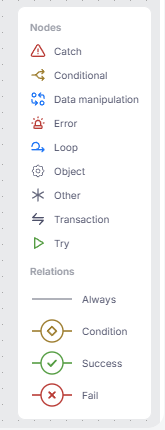
The rest of this article explains what each element means and how to read it.
Start and end
Every diagram begins with a BEGIN marker pointing at the first executed statement. END markers follow every statement after which the execution terminates — the last statement of the object, a RETURN or LEAVE, or an error that ends the run.
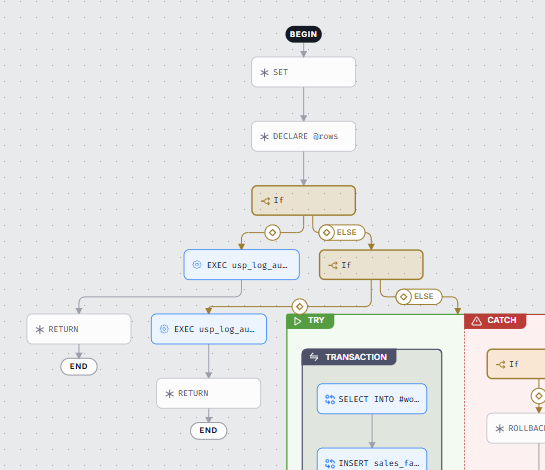
Statement nodes
Statements are the building blocks of the flow. Depending on what a statement does, it is drawn as one of four node kinds:
Procedure and function calls
A call to another stored procedure or function (an Object node) is shown with the name of the called routine, for example EXEC usp_log_audit. If the routine is documented in the catalog, the node links to its page — where you can open its own Execution Flow.
Data manipulation
Statements that create or modify data — INSERT, UPDATE, DELETE, MERGE, SELECT INTO, CREATE TABLE, and similar — are labeled with the verb and the target object (for example, INSERT sales_fact). When Data Lineage was built from the same script, the node links to the lineage process created from that statement, connecting the Execution Flow with the flow of data.
Errors
Statements that raise an error — such as RAISERROR, THROW, or SIGNAL — are drawn in red. An error ends the current path: inside a TRY block, control moves to the catch section; otherwise, the path finishes with an END marker.
Other statements
Remaining statements — DECLARE, SET, COMMIT, ROLLBACK, PRINT, RETURN, cursor operations, and similar — are labeled with the statement type or a short summary (for example, SET @retry).
Containers
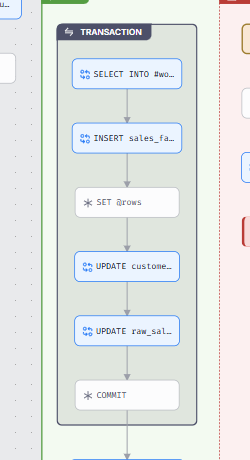
Some statements execute multiple times. They usually control a block of other statements, for example a loop that repeats its body, or a transaction that groups the statements it commits or rolls back together. These are drawn as containers: boxes that visually group the statements they control, so you can see at a glance which statements belong to which construct.
Loop
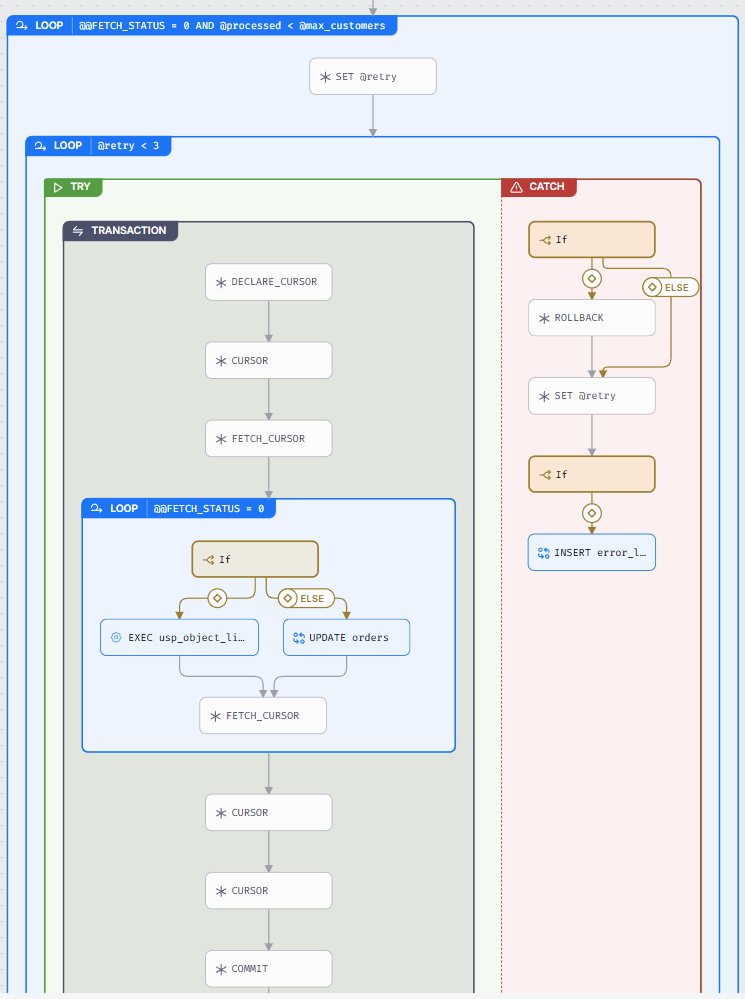
A WHILE or FOR loop is represented as a box labeled with the loop condition (for example, @retry < 3). This box wraps all elements of the loop — the statements inside it repeat as long as the condition holds. Loops can nest — a loop inside a loop is drawn as a box within a box. Two statements change the normal looping:
CONTINUEjumps back to the beginning of the loop — drawn as an arrow returning to the loopBREAKexits the loop — its arrow leaves the box and continues with the first statement after the loop
Try / Catch
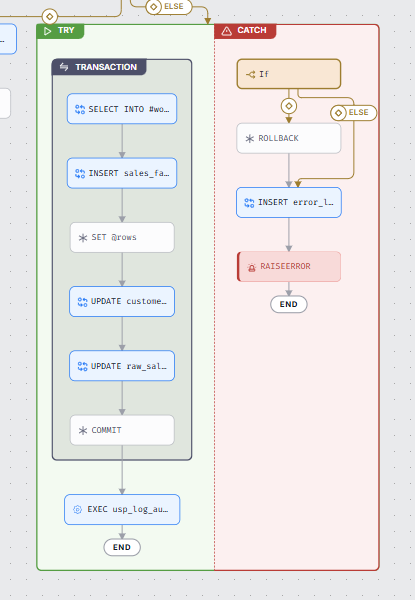
A TRY … CATCH construct is drawn as a container with two sections: the try section with the guarded statements and the catch section with the error handler. When any statement in the try section fails, control moves to the catch section — the fail path. When the try section completes without errors, the flow continues past the container — the success path.
Transaction
A BEGIN TRANSACTION … COMMIT/ROLLBACK span is a container wrapping every statement executed inside the transaction. Nested transactions are drawn as nested boxes.
Branches
An IF statement is a Conditional node — a branch point with arrows, each pointing to a possible path. The arrows carry branch markers, and the path taken when no condition matches is labeled ELSE. An IF / ELSE IF / ELSE chain is collapsed into one branch point with multiple outgoing arrows.
Arrows
Arrows show how control passes between statements:
| Arrow | Meaning |
|---|---|
| Always — plain arrow | The next statement in sequence. |
| Condition — arrow with a branch marker | A conditional branch out of a Conditional node; the ELSE label marks the path taken when no condition matches. |
| Success — green check marker | The path taken when the preceding step completes without errors — for example, continuation after a TRY … CATCH block. |
| Fail — red cross marker | The error route — taken when a statement fails or raises an error, for example into the catch section. |
Note that arrows never point at a container itself — flow always enters at the container's first statement and leaves from its last one. The boxes only show scope.

