Execution Flows are a beta feature. Details of the diagrams may change in future versions.
Execution Flows
Dataedo Execution Flows visualize the logic of your database code. For each imported stored procedure, function, or ETL pipeline, Dataedo builds an interactive diagram that shows how the code executes — the order of statements, branches, loops, error handling, and transactions — so you can understand a process without reading its source code.
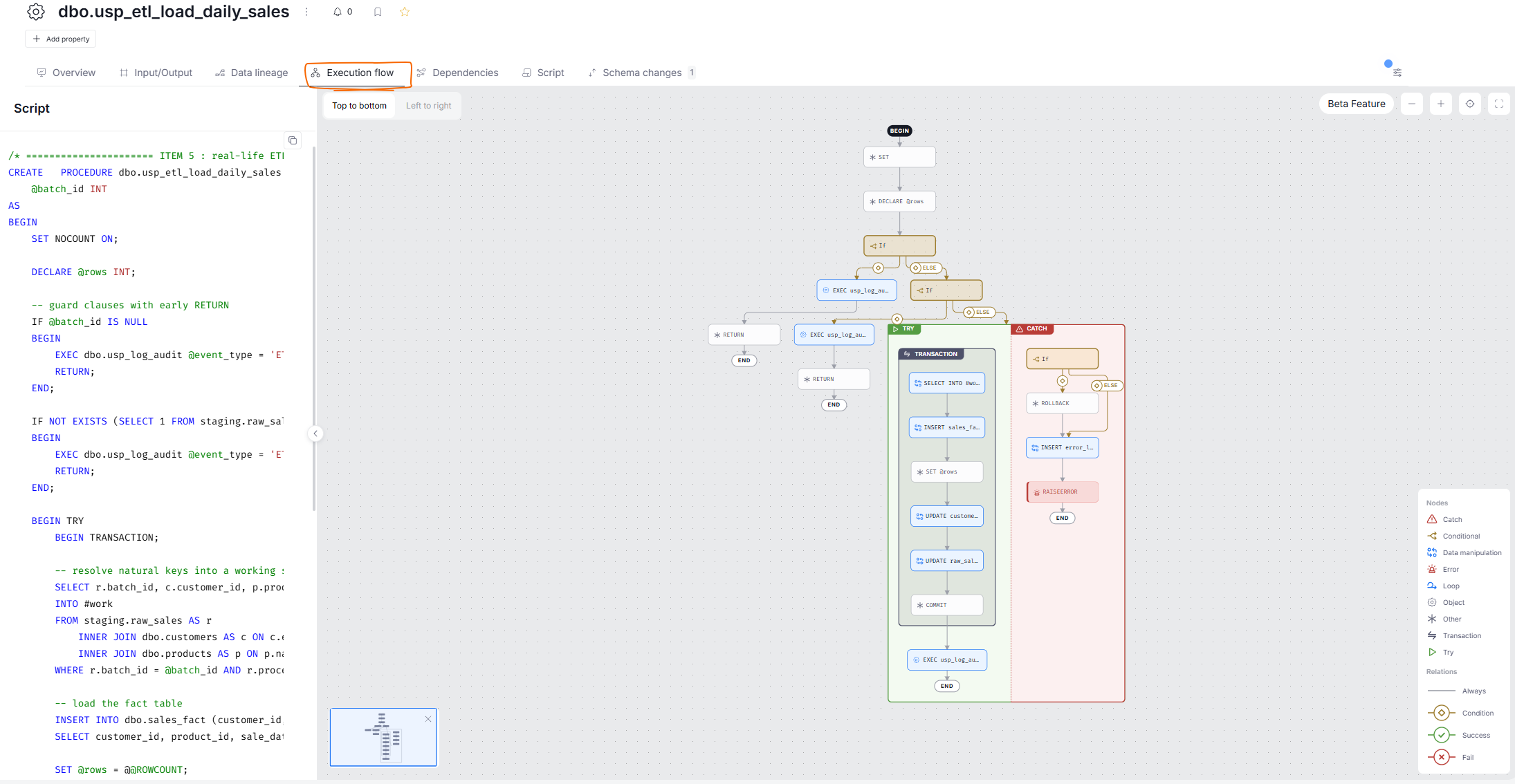
Why use Execution Flows?
How Execution Flows are built
Execution Flows are generated automatically during metadata import:
- for databases, Dataedo analyzes the definitions of stored procedures and user-defined functions with its built-in SQL Parser and maps every statement and control-flow construct into a diagram
- for ETL tools, the flow is built from the structure of the pipeline itself — its activities and the dependencies between them
Execution Flows are stored in the repository like any other metadata and are refreshed on every import that has the option enabled. See the list of supported connectors.
Enabling Execution Flows
Building Execution Flows is optional and configured per data source:
- Dataedo Portal — when scheduling a Metadata import or editing an existing one, select the Build execution flows option in the Metadata extraction section
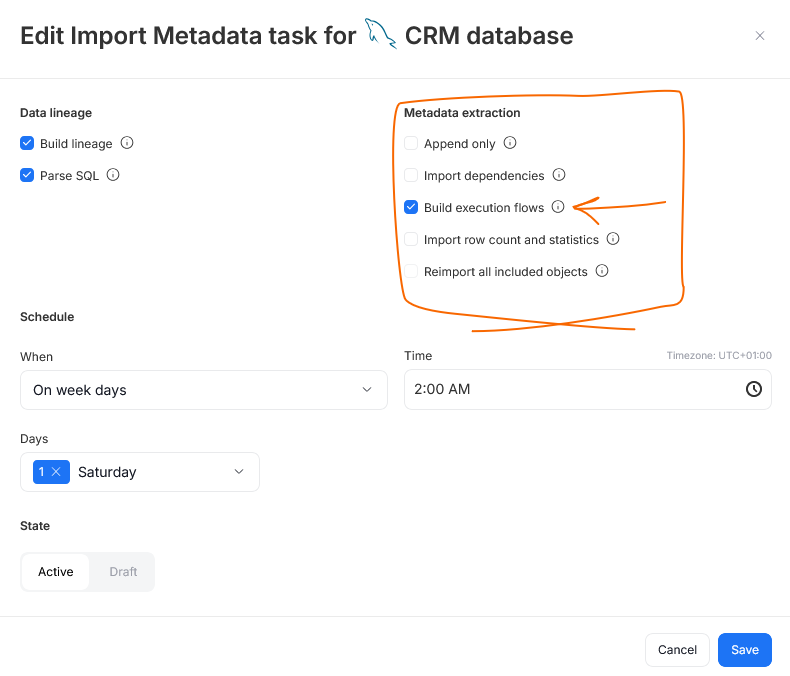
- Dataedo Desktop — check the Build execution flows option in the import options when connecting or synchronizing a data source. The option appears only for connectors that support Execution Flows
After the import completes, diagrams are available in Dataedo Portal on the pages of the imported objects. See Execution Flows in Dataedo Portal.
Requirements and permissions
To build Execution Flows during import:
- the connector must support Execution Flows
- your Dataedo license must include the Execution Flows module (all current licenses except for Dataedo Essentials have it)
- the account used for the import must be able to read object definitions from the source — the flow is built from the definition, so objects imported without one are skipped. Permission details are source-specific; see the connector articles
To view Execution Flows in Dataedo Portal:
- the viewer needs access to the documentation and to the object itself — the Execution flow tab appears only on objects the user can see
- the diagram never exposes metadata of referenced objects the viewer has no access to — such nodes are displayed without a link to the catalog
- viewing the SQL script of the flow requires the permission to view scripts. Without it, the diagram still renders, but the script panel is hidden
When Execution Flows are not generated
| Situation | What happens and how to fix it |
|---|---|
| The Build execution flows option was off during import | No flows are built. Enable the option and re-run the import. |
| The connector does not support Execution Flows | The option is not available. Check the supported connectors. |
| Your license does not include the Execution Flows module | The feature is not available. Contact [email protected] to extend your license. |
| The object's definition was not imported (e.g., missing permission on the source, encrypted object) | The flow cannot be built. Grant the import account access to definitions and re-import. |
| The object's code uses syntax not supported by the SQL Parser | The flow for that object is skipped and the import summary shows a warning with the number of flows that could not be generated. |
| The object is not a code object | Execution Flows exist only for stored procedures, user-defined functions, and ETL pipelines. |

